免费高级Python吠陀占星库与API
VedAstro Python库让您即时访问全球最全面的吠陀占星引擎——行星位置、分盘图、达萨周期、相容性报告以及人工智能驱动的功能,全部通过一个pip install即可实现。
无论你是在构建星座运势应用、匹配平台,还是研究工具,VedAstro的Python库都能消除你与专业吠陀占星计算之间的所有障碍。无需复杂的设置。无需本地二进制。入门无需占星专业知识。只需安装库,设置API密钥,开始计算——繁重的工作运行在VedAstro的云引擎上。
你要拿到什么
684
计算——任何占星编程库中最大的集合
47
Ayanamsa系统——Lahiri、Raman、KP、Fagan-Bradley及其他43个
D1–D60
分区图——完整的帕拉沙里瓦尔加系统覆盖
AI驱动
出生时间自动填充与自然语言星座运势搜索
零点
所有设备都运行在云端——你的应用保持轻量级
开源
MIT授权,社区维护,GitHub上完全可审计
设计简单
VedAstro Python 库是一个精简优雅的 VedAstro REST API 封装工具。你写 Python;云端负责计算。
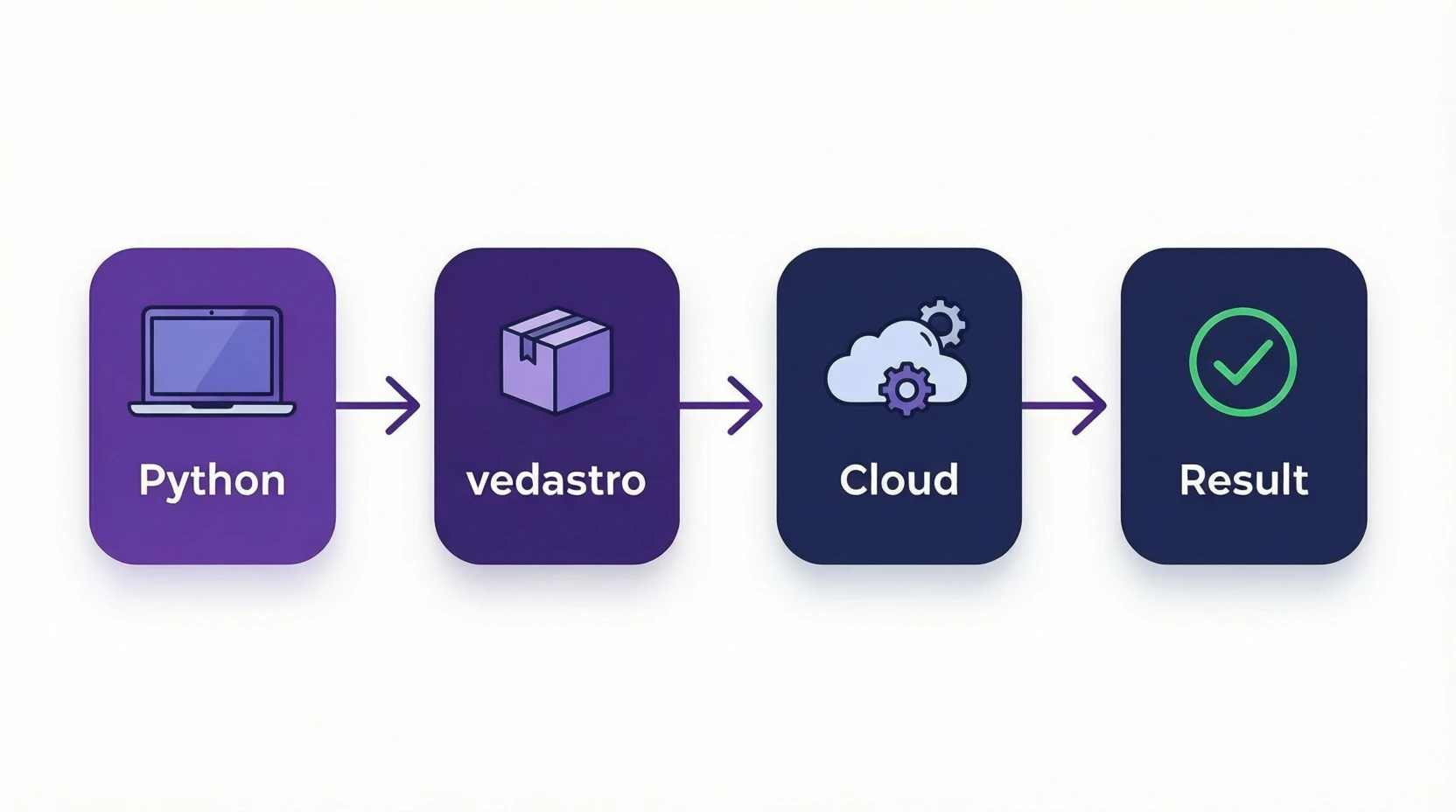
没有重型安装
这个库本身很小——所有设备都运行在服务器端
始终保持最新
计算改进会自动在服务器上推出
和你一起上天
从个人项目到生产应用,代码都一样
30秒内启动
从 PyPI 安装库

pip install vedastro仅此而已。没有DLL,没有C扩展,也没有星历文件可下载。
看看实际操作
通过三行获取任何出生星盘的完整行星数据集:
from vedastro import *

Calculate.SetAPIKey('your-api-key')

geo = GeoLocation("Tokyo, Japan", 139.83, 35.65)
birth_time = Time(hour=23, minute=40, day=31, month=12, year=2010, offset="+08:00", geolocation=geo)

result = Calculate.AllPlanetData(PlanetName.Sun, birth_time)
Tools.Print(result)
基于库塔的两个星座运势兼容性分析:
from vedastro import *

Calculate.SetAPIKey('your-api-key')

romeo = Time("23:40 31/12/1996 +08:00", GeoLocation("Tokyo, Japan", 139.83, 35.65))
juliet = Time("14:30 15/06/1997 -05:00", GeoLocation("New York, USA", -74.006, 40.7128))

match = Calculate.MatchReport(romeo, juliet)
Tools.Print(match)
查找任意日期范围、任意子时期深度的达萨周期:
from vedastro import *
import json

Calculate.SetAPIKey('your-api-key')

geo = GeoLocation("Tokyo, Japan", 139.83, 35.65)
birth_time = Time("23:40 31/12/2010 +08:00", geo)

dasa = Calculate.DasaForLife(birth_time, "VimshottariJanma", depth=3)
print(json.dumps(dasa, indent=4))
提出一个简单的英语问题,即可获得古典吠陀文献中最相关的段落——无需精确关键词:
from vedastro import *

Calculate.SetAPIKey('your-api-key')

# see which classical texts are searchable
print(Calculate.GetAvailableSourceTexts())

# natural-language semantic search across all texts
passages = Calculate.SearchSourceText("effects of Saturn in the 7th house", topK=5)

for p in passages:
print(p["sourceName"], p["pageNumber"], p["text"])涵盖每个主要领域的684次计算
| 类别 | 包含内容 |
|---|---|
| 位置、经度、强度、相位、合相、逆行状态 | |
| 宫位星座、主宰、宫位图、所有宫位数据 | |
| D1至D60——Navamsha、Drekkana及所有varga图 | |
| 基于符号的计算,行星与星座查询 | |
| 带有明确起始规则和可配置深度的维姆绍塔里命盘周期 | |
| 吉时测定,任何日期范围的事件预测 | |
| Kuta评分、完整兼容性报告、BaZi集成、AI聊天分析 | |
| 出生时间自动填充,来自部分数据,自然语言星座运势搜索 |
完整方法参考:vedastro.org/API.html
47 阿亚南萨系统 — 吠陀、西方和开普敦
将ayanamsa系统切换为单线
拉希里
现代吠陀标准
拉曼
VedAstro 默认
克里希那穆提
KP系统
法根-布拉德利
西恒星星
Calculate.SetAyanamsa(Ayanamsa.Lahiri)
Calculate.SetAyanamsa(Ayanamsa.Fagan_Bradley)
Calculate.SetAyanamsa(Ayanamsa.Krishnamurti)
自由开始。准备好了再秤。
免费
速率限制
'FreeAPIUser'无需注册——非常适合探索和开发
Calculate.SetAPIKey('your-key-here')现成型示例
GitHub仓库包含了完整的演示脚本,可以立即帮助你上手
from vedastro import *  # install via pip

# PART 0 : Set API key
Calculate.SetAPIKey('FreeAPIUser')  # !! unlimited speed  API key from "vedastro.org/API.html"

# PART 1 : PREPARE NEEDED DATA
#-----------------------------------

# set birth location
geolocation = GeoLocation("Tokyo, Japan", 139.83, 35.65)

# group all birth time data together (day/month/year)
birth_time = Time("23:40 31/12/2010 +08:00", geolocation)


#PART 2 : CALCULATE ALL DATA
#-----------------------------------

#PLANETS
allPlanetDataList = Calculate.AllPlanetData(PlanetName.Sun, birth_time)
Tools.Print(allPlanetDataList)

#HOUSES
allHouseDataList = Calculate.AllHouseData(HouseName.House1, birth_time)
Tools.Print(allHouseDataList)

#ZODIAC SIGNS
allZodiacDataList = Calculate.AllZodiacSignData(ZodiacName.Gemini, birth_time)
Tools.Print(allZodiacDataList)from vedastro import * # install via pip
# PART 0 : Set API key
Calculate.SetAPIKey('FreeAPIUser') # !! unlimited speed API key from "vedastro.org/API.html"
# PART 1 : PREPARE NEEDED DATA
#-----------------------------------
# set birth location
geolocation = GeoLocation("Tokyo, Japan", 139.83, 35.65)
# group all birth time data together (day/month/year)
birth_time = Time("23:40 31/12/2010 +08:00", geolocation)
#PART 2 : CALCULATE ALL DATA
#-----------------------------------
#PLANETS
allPlanetDataList = Calculate.AllPlanetData(PlanetName.Sun, birth_time)
jsonStringA = Tools.AnyToJSON("", allPlanetDataList)
print(jsonStringA)
#HOUSES
allHouseDataList = Calculate.AllHouseData(HouseName.House1, birth_time)
jsonStringB = Tools.AnyToJSON("", allHouseDataList)
print(jsonStringB)
#ZODIAC SIGNS
allZodiacDataList = Calculate.AllZodiacSignData(ZodiacName.Gemini, birth_time)
jsonStringC = Tools.AnyToJSON("", allZodiacDataList)
print(jsonStringC)from vedastro import * # install via pip
import datetime
import pandas as pd # Install via pip if not already installed
import json
# PART 0 : Set API key
Calculate.SetAPIKey('FreeAPIUser') # !! unlimited speed API key from "vedastro.org/API.html"
# PART 1 : PREPARE NEEDED DATA
# -----------------------------------
# Set birth location
geolocation = GeoLocation("Tokyo, Japan", 139.83, 35.65)
# Initial birth time string
birth_time_str = "23:40 31/12/2010 +08:00"
# Parse the initial birth time string into a datetime object
birth_datetime = datetime.datetime.strptime(birth_time_str, "%H:%M %d/%m/%Y %z")
# PART 2 : GENERATE TIME INSTANCES AND CALCULATE DATA
# -----------------------------------
# List to store all results
results = []
# Define the planet for which data is to be calculated
planet = PlanetName.Sun # You can change this to other planets as needed
# Loop to create 100 time instances, incrementing by 1 hour each
for i in range(10):
try:
# Increment the time by 'i' hours
current_datetime = birth_datetime + datetime.timedelta(hours=i)
# Format the new datetime back to the string format expected by Vedastro's Time class
current_time_str = current_datetime.strftime("%H:%M %d/%m/%Y %z")
# Create a Time object with the new time
current_time = Time(current_time_str, geolocation)
# Calculate all planet data for the specified planet at the current time
planet_data = Calculate.AllPlanetData(planet, current_time)
# Flatten the planet_data if it's a nested dictionary
# This step depends on the actual structure of planet_data
# For demonstration, let's assume it's a flat dictionary
flat_data = {
"time": current_time_str,
"planet": planet.value # Assuming PlanetName is an Enum
}
# Update flat_data with planet_data
if isinstance(planet_data, dict):
for key, value in planet_data.items():
# Handle nested dictionaries if necessary
if isinstance(value, dict):
for sub_key, sub_value in value.items():
flat_data[f"{key}_{sub_key}"] = sub_value
else:
flat_data[key] = value
else:
# If planet_data is not a dict, store it as a string
flat_data["planet_data"] = str(planet_data)
# Append the flattened data to the results list
results.append(flat_data)
except Exception as e:
print(f"Error at iteration {i}: {e}")
# Optionally, you can decide to continue or break the loop based on the error
continue
# PART 3 : SAVE THE RESULTS TO A CSV FILE
# -----------------------------------
# Convert the results list to a pandas DataFrame
df = pd.DataFrame(results)
# Optional: Reorder columns if necessary
# For example, place 'time' and 'planet' first
cols = ['time', 'planet'] + [col for col in df.columns if col not in ['time', 'planet']]
df = df[cols]
# Save the DataFrame to a CSV file
csv_filename = 'planet_data_results.csv'
df.to_csv(csv_filename, index=False)
print(f"Data successfully saved to {csv_filename}")from vedastro import * # install via pip
import re
# PART 0 : Set API key
Calculate.SetAPIKey('FreeAPIUser') # !! unlimited speed API key from "vedastro.org/API.html"
# PART 1 : Define CALCULATE Planet DATA Function
#---------------------------------------
def getplanetinfo(planet, time):
planet_data = Calculate.AllPlanetData(planet, time)
degree = str(planet_data[83])
# Extracting degrees, minutes, and seconds from a string
degree, minute, second = map(int, re.findall(r'\d+', degree))
# Convert to decimal
decimal_degrees = degree + (minute / 60) + (second / 3600)
is_retrograde = str(planet_data[28])
if is_retrograde == 'True':
is_retrograde = True
else:
is_retrograde = False
json_data = {"name":str(planet),
"is_retrograde":is_retrograde,
"position":str(planet_data[0]),
"degree":decimal_degrees,
"longitude":float(str(planet_data[61]))
}
return json_data
#PART 2 : PREPARE NEEDED DATA
#-----------------------------------
# set birth location
geolocation = GeoLocation("Tokyo, Japan", 139.83, 35.65)
# group all birth time data together (day/month/year)
time = Time("23:40 31/12/2010 +08:00", geolocation)
#PART 3 : Make all Planet Json Format Info using Method
#------------------------------------------------------
# PLANETS
json_data = []
json_data.append(getplanetinfo(PlanetName.Sun, time))
json_data.append(getplanetinfo(PlanetName.Moon, time))
json_data.append(getplanetinfo(PlanetName.Mercury, time))
json_data.append(getplanetinfo(PlanetName.Venus, time))
json_data.append(getplanetinfo(PlanetName.Mars, time))
json_data.append(getplanetinfo(PlanetName.Jupiter, time))
json_data.append(getplanetinfo(PlanetName.Saturn, time))
json_data.append(getplanetinfo(PlanetName.Rahu, time))
json_data.append(getplanetinfo(PlanetName.Ketu, time))
result = {'status': 'ok',
'data': {'planet_position':json_data}
}
# Print
print(result)from vedastro import * # install via pip
# THIS DEMO CALCULATES DATA NEEDED TO MAKE BHAVA CHART
# PART 0 : Set API key
Calculate.SetAPIKey('FreeAPIUser') # !! unlimited speed API key from "vedastro.org/API.html"
# PART 1 : PREPARE NEEDED DATA
#-----------------------------------
# set birth location
geolocation = GeoLocation("Tokyo, Japan", 139.83, 35.65)
# group all birth time data together (day/month/year)
birth_time = Time("23:40 31/12/2010 +08:00", geolocation)
#PART 2 : CALCULATE DATA FOR CHART
#-----------------------------------
# Get the sign for House 1
house1ZodiacSign = Calculate.HouseSignName(HouseName.House1, birth_time)
Tools.Print(house1ZodiacSign)
# Get Planets in House 1 (Bhava Chart)
planetsInHouse1 = Calculate.PlanetsInHouseBasedOnSign(HouseName.House1, birth_time)
Tools.Print(planetsInHouse1)
# Get Planets in House 1 (Rasi Chart)
planetsInHouse1 = Calculate.PlanetsInHouseBasedOnSign(HouseName.House1, birth_time)
Tools.Print(planetsInHouse1)
# Get the sign for House 2
# ......from vedastro import * # install via pip
# PART 0 : Set API key
Calculate.SetAPIKey('FreeAPIUser') # !! unlimited speed API key from "vedastro.org/API.html"
# Set custom ayanamsa (the API default is Lahiri when none is sent)
Calculate.SetAyanamsa(Ayanamsa.Lahiri)
# PART 1 : PREPARE NEEDED DATA
#-----------------------------------
# set birth location
geo = GeoLocation("Tokyo, Japan", 139.83, 35.65)
# group all birth time data together (day/month/year)
birth_time = Time("23:40 31/12/2010 +08:00", geo)
# get planet data using custom ayanamsa
result = Calculate.AllPlanetData(PlanetName.Sun, birth_time)
Tools.Print(result)from vedastro import * # install via pip
# PART 0 : Set API key
Calculate.SetAPIKey('FreeAPIUser') # !! unlimited speed API key from "vedastro.org/API.html"
# PART 1 : PREPARE NEEDED DATA
#-----------------------------------
# set location
geolocation = GeoLocation("Tokyo, Japan", 139.83, 35.65)
# set time hh:mm dd/mm/yyyy zzz
birthTime = Time("23:40 31/12/2010 +08:00", geolocation)
# run calculator to get result
calcResult = Calculate.HoroscopePredictions(birthTime)
# display results
Tools.Print(calcResult)from vedastro import * # install via pip
import json
# PART 0 : Set API key
Calculate.SetAPIKey('FreeAPIUser') # !! unlimited speed API key from "vedastro.org/API.html"
#PART 1 : PREPARE NEEDED DATA
#-----------------------------------
# set birth location
geolocation = GeoLocation("Tokyo, Japan", 139.83, 35.65)
romeo_birth_time = Time("23:40 31/12/1996 +08:00", geolocation)
juliet_birth_time = Time("23:40 31/12/1997 +08:00", geolocation)
#PART 2 : CALCULATE
#-----------------------------------
matchReport = Calculate.MatchReport(romeo_birth_time, juliet_birth_time)
print(json.dumps(matchReport, indent=4))from vedastro import * # install via pip
import json
# PART 0 : Set API key
Calculate.SetAPIKey('FreeAPIUser') # !!unlimited speed API key from "vedastro.org/API.html"
# PART 1 : PREPARE NEEDED DATA
#-----------------------------------
# set birth location
geolocation = GeoLocation("Tokyo, Japan", 139.83, 35.65)
# group all birth time data together (day/month/year)
birth_time = Time("23:40 31/12/2010 +07:00", geolocation)
# set start and end time for the range
start_time = Time("00:00 01/01/2020 +08:00", geolocation)
end_time = Time("23:59 31/12/2025 +08:00", geolocation)
# PART 2 : CALCULATE DASA
#-----------------------------------
# Choose the starting system explicitly; levels controls nesting depth.
levels = 3 # represents Dasa, Bhukti, Antaram, Pratyanthar, etc...
dasaAtRange = Calculate.DasaAtRange(birth_time, start_time, end_time, "VimshottariJanma", levels=levels)
print(json.dumps(dasaAtRange, indent=4))"""
DEMO: RAG — Semantic Search of Classical Vedic Texts
USE CASE: Ask a plain-English question and get back the most relevant passages
from classical Vedic astrology books (BPHS, Phaladeepika, Hindu
Predictive Astrology, etc.) — the same RAG feature that powers the
"Vedic Books" search on vedastro.org.
DIFFICULTY: Intermediate
WHAT YOU'LL LEARN:
- How to list which classical texts are searchable (GetAvailableSourceTexts)
- How to run a natural-language semantic search (SearchSourceText)
- How to read each result: source book, page number, similarity score, text
- How to narrow a search to a single book and tune topK / contextSize
HOW IT WORKS:
Your query is embedded and matched against a vector index built from the full
text of the classical books. You get back the passages whose meaning is closest
to your question — no exact keywords required. This is the same retrieval step
used internally by VedAstro's AI/RAG enrichment.
PREREQUISITES:
- pip install vedastro
RUN:
python demo_rag_vedic_books.py
EXPECTED OUTPUT (abridged):
Available source texts:
- Brihat-Parashara-Hora-Shastra
- Hindu-Predictive-Astrology
- Phaladeepika
...
Query: "effects of Saturn in the 7th house"
[1] Hindu-Predictive-Astrology p.142 (relevance 71.3%)
Saturn in the 7th house makes the native ...
...
"""
# Import everything from VedAstro
from vedastro import *
def relevance_pct(passage):
"""Convert the raw similarity score (lower = closer) to a 0-100% relevance.
Mirrors the formula used by the website's RAG UI: (1 - score) * 100.
Defaults to a score of 1 (0% relevance) when the field is missing.
"""
score = passage.get("score", 1)
pct = (1 - score) * 100
# clamp to 0-100 so odd scores never print a negative / >100 value
return max(0.0, min(100.0, pct))
def print_passages(passages):
"""Pretty-print a list of retrieved passages."""
if not passages:
print(" (no passages found — try different wording)")
return
# closest match first (lowest score = highest relevance)
passages = sorted(passages, key=lambda p: p.get("score", 1))
for i, p in enumerate(passages, start=1):
source = p.get("sourceName") or "Unknown source"
page = p.get("pageNumber") or "?"
text = (p.get("text") or "").strip()
print(f" [{i}] {source} p.{page} (relevance {relevance_pct(p):.1f}%)")
print(f" {text}\n")
def main():
# Step 1: Set API Key
# Free tier: 'FreeAPIUser' (5 requests/min). Premium key: vedastro.org/API.html
Calculate.SetAPIKey('FreeAPIUser')
# Step 2: Discover which classical texts are available to search
print("Available source texts:")
for name in Calculate.GetAvailableSourceTexts():
print(f" - {name}")
print()
# Step 3: Basic semantic search across ALL texts
# No exact keywords needed — the query is matched by meaning.
query = "effects of Saturn in the 7th house"
print(f'Query: "{query}"')
results = Calculate.SearchSourceText(query) # topK defaults to 5
print_passages(results)
# Step 4: Scoped search — restrict to one book and tune the knobs
# sourceName : limit retrieval to a single classical text
# topK : how many passages to return
# contextSize : characters of surrounding context per passage (default 600)
query2 = "results of Jupiter aspecting the Moon"
print(f'Query (Hindu Predictive Astrology only): "{query2}"')
results2 = Calculate.SearchSourceText(
query2,
topK=3,
sourceName="Hindu-Predictive-Astrology",
contextSize=800,
)
print_passages(results2)
if __name__ == "__main__":
main()
# NEXT STEPS:
# - Swap in your own question — anything about planets, houses, yogas, dasas.
# - Drop the sourceName argument to search every book at once.
# - Feed the retrieved passages into an LLM prompt to build a cited astrology
# chatbot (retrieval-augmented generation).from vedastro import * # install via pip
# PART 0 : Set API key
Calculate.SetAPIKey('FreeAPIUser') # !! unlimited speed API key from "vedastro.org/API.html"
# PART 1 : PREPARE NEEDED DATA
#-----------------------------------
# set location
geolocation = GeoLocation("Tokyo, Japan", 139.83, 35.65)
# set time hh:mm dd/mm/yyyy zzz
time = Time("23:40 31/12/2010 +08:00", geolocation)
# set planet
planetName = PlanetName.Sun
# run calculator to get result
calcResult = Calculate.HousePlanetOccupiesBasedOnSign(planetName, time)
# display results
Tools.Print(calcResult)
由用户创建并资助 — 支持VedAstro