免费高级Node.js吠陀占星库与API
VedAstro Node.js 库让您即时访问世界上最全面的吠陀占星引擎——行星位置、分盘图、dasā时期、相容性报告以及人工智能驱动的功能,全部通过轻量级 SDK 实现。

无论您是开发占星应用、婚配平台还是研究工具,VedAstro 的 Node.js 库都能消除您与专业级吠陀占星计算之间的所有障碍。无需复杂的设置,无需本地二进制文件,无需占星学专业知识即可快速上手。只需安装该库,设置您的 API 密钥,即可开始计算——繁重的运算由 VedAstro 的云引擎完成。
你要拿到什么
684
为吠陀占星应用提供的托管计算
47
Ayanamsa系统——Lahiri、Raman、KP、Fagan-Bradley及其他43个
D1–D60
分区图——完整的帕拉沙里瓦尔加系统覆盖
AI驱动
命盘预测与古典文献检索
零点
所有设备都运行在云端——你的应用保持轻量级
开源
MIT授权,社区维护,GitHub上完全可审计
设计简单
VedAstro Node.js 库是 VedAstro REST API 的一个简洁优雅的封装。您编写 Node.js 代码;云端完成计算。
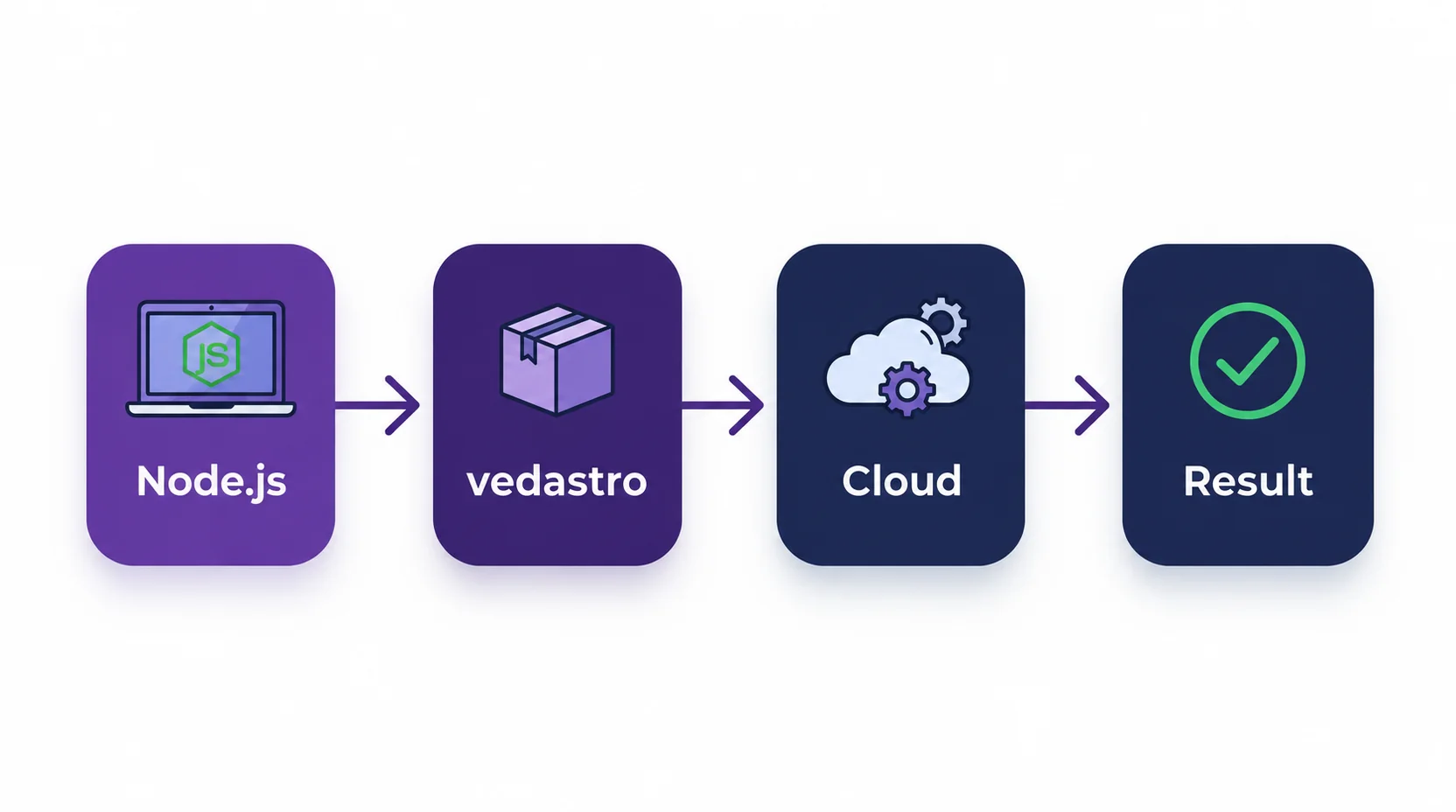
没有重型安装
这个库本身很小——所有设备都运行在服务器端
始终保持最新
计算改进会自动在服务器上推出
和你一起上天
从个人项目到生产应用,代码都一样
安装 Node.js SDK
Node.js 22 或更新版本以及互联网连接
npm install vedastro将ES模块示例保存为 .mjs 文件,或使用带有 "type": "module" 的项目。每次计算都返回一个 Promise;请使用 await。使用 CommonJS 的用户可使用 require(),并将调用置于 async 函数内。
FreeAPIUser 每分钟允许 5 次请求。请控制多调用示例,或使用您的订阅密钥。位置信息需先输入经度,再输入纬度。
看看实际操作
使用免费密钥进行一次太阳星座计算,作为起点。
import { Calculate, Time, GeoLocation, PlanetName } from 'vedastro';

// 'FreeAPIUser' is the free-tier key (5 requests per minute).
// For a paid key: Calculate.SetAPIKey(process.env.VEDASTRO_API_KEY)
Calculate.SetAPIKey('FreeAPIUser');

// Time format: "HH:MM DD/MM/YYYY +TZ:TZ"
// GeoLocation takes (name, longitude, latitude) — in that order.
const birth = new Time('14:30 25/10/1992 +05:30',
  new GeoLocation('Mumbai', 72.8777, 19.0760));

const sun = await Calculate.PlanetRasiD1Sign(PlanetName.Sun, birth);
console.log(`Sun sign: ${sun.Name}`); // "Libra"
保存为 main.mjs 并运行 node main.mjs。
CommonJS
const { Calculate, Time, GeoLocation, PlanetName } = require('vedastro');

async function main() {
  Calculate.SetAPIKey('FreeAPIUser');
  const birth = new Time('14:30 25/10/1992 +05:30',
    new GeoLocation('Mumbai', 72.8777, 19.0760));
  const sun = await Calculate.PlanetRasiD1Sign(PlanetName.Sun, birth);
  console.log(`Sun sign: ${sun.Name}`);
}

main().catch(error => console.error(error.message));
婚姻相合度
从克隆的SDK仓库中运行;辅助文件包含在其中。
/**
 * DEMO: Marriage Compatibility (Kuta system)
 * USE CASE: Check two people's compatibility with the 16-factor Kuta analysis
 * DIFFICULTY: Beginner
 *
 * RUN:
 *   node demo_marriage_compatibility.js
 */
import { Calculate, Time, GeoLocation } from 'vedastro';

try {
  Calculate.SetAPIKey('FreeAPIUser');

  const person1 = new Time('23:40 31/12/1996 +09:00',
    new GeoLocation('Tokyo', 139.83, 35.65));
  const person2 = new Time('14:30 15/06/1997 -05:00',
    new GeoLocation('New York', -74.006, 40.7128));

  console.log('Calculating compatibility... (this may take a few seconds)\n');

  const match = await Calculate.MatchReport(person1, person2);

  // KutaScore is normalised to 100 (the classical total is 36 points).
  console.log(`Overall Compatibility: ${match.KutaScore}/100`);
  console.log(`Status: ${match.Summary.ScoreSummary}\n`);

  console.log('16-Factor Kuta Analysis:\n');
  for (const kuta of match.PredictionList) {
    const mark = kuta.Nature === 'Good' ? '[ok]'
      : kuta.Nature === 'Bad' ? '[x]' : '[!]';
    console.log(`${mark} ${kuta.Name}: ${kuta.Nature}`);
    console.log(`   ${kuta.Info}\n`);
  }

  // INTERPRETING THE SCORE (classical 36-point scale)
  //   33-36  excellent   25-32  good
  //   18-24  average     < 18   poor
  // Nadi Kuta (health & progeny) is traditionally the most heavily weighted.
  // A low score indicates challenges, not destiny — treat it as one input.
} catch (error) {
  console.error(error.message);
  process.exitCode = 1;
}维姆肖塔里达萨
从克隆的SDK仓库中运行;辅助文件包含在其中。
/**
 * DEMO: Vimshottari Dasa Timeline
 * USE CASE: Planetary periods (Mahadasa -> Bhukti -> Antaram) over a date range
 * DIFFICULTY: Intermediate
 *
 * RUN:
 *   node demo_vimshottari_dasa.js
 */
import { Calculate, Time, GeoLocation, DasaType } from 'vedastro';

try {
  Calculate.SetAPIKey('FreeAPIUser');

  const mumbai = new GeoLocation('Mumbai', 72.8777, 19.0760);
  const birth = new Time('14:30 25/10/1992 +05:30', mumbai);

  const start = new Time('00:00 01/01/2020 +05:30', mumbai);
  const end = new Time('23:59 31/12/2030 +05:30', mumbai);

  // levels         = nesting depth (1 = Mahadasa, 2 = +Bhukti, 3 = +Antaram)
  const dasa = await Calculate.DasaAtRange(birth, start, end, DasaType.VimshottariJanma, 3);

  console.log(JSON.stringify(dasa, null, 2));

  // A single moment instead of a range:
  //   await Calculate.DasaAtTime(birth, someTime, DasaType.VimshottariJanma, 3)
  // The whole life span:
  //   await Calculate.DasaForLife(birth, DasaType.VimshottariJanma, 120, 3)
} catch (error) {
  console.error(error.message);
  process.exitCode = 1;
}涵盖每个主要领域的684次计算
| 类别 | 包含内容 |
|---|---|
| 位置、经度、强度、相位、合相、逆行状态 | |
| 宫位星座、主宰、宫位图、所有宫位数据 | |
| D1至D60——Navamsha、Drekkana及所有varga图 | |
| 基于符号的计算,行星与星座查询 | |
| 带有明确起始规则和可配置深度的维姆绍塔里命盘周期 | |
| 吉时测定,任何日期范围的事件预测 | |
| Kuta评分、完整兼容性报告、BaZi集成、AI聊天分析 | |
| 出生时间自动填充,来自部分数据,自然语言星座运势搜索 |
完整方法参考:vedastro.org/API.html
47 阿亚南萨系统 — 吠陀、西方和开普敦
通过SDK特定设置切换阿亚纳姆萨系统
拉希里
现代吠陀标准
拉曼
古典吠陀体系
克里希那穆提
KP系统
法根-布拉德利
西恒星星
/**
 * DEMO: Custom Ayanamsa
 * USE CASE: Compare the same chart under different ayanamsa systems
 * DIFFICULTY: Intermediate
 *
 * WHY use_ayanamsa: Node.js is concurrent. A plain global would leak between
 * overlapping requests; use_ayanamsa scopes the value with AsyncLocalStorage.
 *
 * RUN:
 *   node demo_custom_ayanamsa.js
 */
import { Calculate, Time, GeoLocation, Ayanamsa } from 'vedastro';

const sleep = ms => new Promise(resolve => setTimeout(resolve, ms));

try {
  Calculate.SetAPIKey('FreeAPIUser');

  const birth = new Time('23:40 31/12/2010 +08:00',
    new GeoLocation('Tokyo, Japan', 139.83, 35.65));

  const none = Calculate.GetAyanamsa();
  console.log(`Default ayanamsa: ${none ?? '(none set — API default measures as Lahiri)'}`);
  console.log(`Default degree:   ${(await Calculate.AyanamsaDegree(birth)).DegreeMinuteSecond}`);

  for (const ayanamsa of [Ayanamsa.Lahiri, Ayanamsa.Raman]) {
    await sleep(12_500);
    await Calculate.use_ayanamsa(ayanamsa, async () => {
      const degree = (await Calculate.AyanamsaDegree(birth)).DegreeMinuteSecond;
      console.log(`${ayanamsa}: ${degree}`);
    });
  }

  // The scoped value is gone once the callback returns.
  console.log(`After scopes:     ${Calculate.GetAyanamsa() ?? '(none set)'}`);
} catch (error) {
  console.error(error.message);
  process.exitCode = 1;
}在此克隆的仓库内运行此示例。查看源码。
自由开始。准备好了再秤。
免费
速率限制
'FreeAPIUser'无需注册——非常适合探索和开发
Calculate.SetAPIKey('your-key-here');现成型示例
克隆仓库以运行这些示例及其附带的辅助工具。展开一个示例以阅读并复制其源代码。
/**
 * DEMO: All Astro Data
 * USE CASE: Dump the complete planet and house dataset for a chart
 * DIFFICULTY: Intermediate
 *
 * AllPlanetData / AllHouseData return large payloads. This demo fetches a few
 * of them and writes the combined result to JSON so you can inspect them.
 *
 * RUN:
 *   node demo_all_astro_data.js
 */
import fs from 'node:fs';
import { Calculate, Time, GeoLocation, PlanetName } from 'vedastro';

const sleep = ms => new Promise(resolve => setTimeout(resolve, ms));

try {
  Calculate.SetAPIKey('FreeAPIUser');

  const birth = new Time('14:30 25/10/1992 +05:30',
    new GeoLocation('Mumbai', 72.8777, 19.0760));

  const report = {};

  // Everything about the Sun, in one call
  report.sun = await Calculate.AllPlanetData(PlanetName.Sun, birth);
  console.log(`Sun data keys: ${Object.keys(report.sun ?? {}).join(', ')}`);
  await sleep(12_500);

  // Everything about the first house
  report.house1 = await Calculate.AllHouseData(1, birth);
  console.log(`House 1 data keys: ${Object.keys(report.house1 ?? {}).join(', ')}`);
  await sleep(12_500);

  // The whole moment: panchanga, positions, dasa and more
  report.time = await Calculate.AllTimeData(birth);
  console.log(`Time data keys: ${Object.keys(report.time ?? {}).join(', ')}`);

  fs.writeFileSync('astro_data.json', JSON.stringify(report, null, 2));
  console.log('\nWrote astro_data.json');
} catch (error) {
  console.error(error.message);
  process.exitCode = 1;
}/**
* DEMO: Batch Processing
* USE CASE: Process many charts without tripping the free tier's rate limit
* DIFFICULTY: Advanced
*
* The free tier allows 5 requests per minute, so a naive Promise.all() over 50
* charts will mostly fail. Two ways to cope are shown below:
* A. A throttled queue (works on the free tier, just slower)
* B. Concurrency with retry (works well on a premium key)
*
* RUN:
* node demo_batch_processing.js
*/
import { Calculate, Time, GeoLocation, PlanetName } from 'vedastro';
const sleep = ms => new Promise(resolve => setTimeout(resolve, ms));
// --- A minimal token-bucket style throttle -------------------------------
// Allows at most `limit` calls per `windowMs`, keeping a minimum gap between
// consecutive calls so the server's sliding window never fills up.
function createThrottle(limit, windowMs) {
const gap = Math.ceil(windowMs / limit);
let last = 0;
return async function throttle() {
const wait = last + gap - Date.now();
if (wait > 0) await sleep(wait);
last = Date.now();
};
}
const people = [
{ name: 'Mumbai', time: '14:30 25/10/1992 +05:30', lon: 72.8777, lat: 19.0760 },
{ name: 'Tokyo', time: '23:40 31/12/2010 +08:00', lon: 139.83, lat: 35.65 },
{ name: 'New York', time: '09:00 15/06/1997 -05:00', lon: -74.006, lat: 40.7128 }
];
try {
Calculate.SetAPIKey('FreeAPIUser');
// --- A. Throttled sequential processing -------------------------------
const throttle = createThrottle(5, 60_000); // 5 calls per minute
const results = [];
for (const person of people) {
await throttle();
const birth = new Time(person.time, new GeoLocation(person.name, person.lon, person.lat));
const sun = await Calculate.PlanetRasiD1Sign(PlanetName.Sun, birth);
results.push({ place: person.name, sunSign: sun.Name });
console.log(`${person.name.padEnd(10)} Sun in ${sun.Name}`);
}
console.log(`\nProcessed ${results.length} charts.`);
console.log(JSON.stringify(results, null, 2));
// --- B. Concurrency with retry (for a premium key) --------------------
// Uncomment if you have a paid key, which allows far more calls per minute.
//
// async function withRetry(fn, attempts = 3) {
// for (let i = 1; i <= attempts; i += 1) {
// try { return await fn(); }
// catch (error) {
// if (i === attempts) throw error;
// await sleep(15_000);
// }
// }
// }
//
// const charts = await Promise.all(people.map(person => withRetry(async () => {
// const birth = new Time(person.time, new GeoLocation(person.name, person.lon, person.lat));
// return { place: person.name, ...(await Calculate.AllPlanetData(PlanetName.Sun, birth)) };
// })));
//
// Tip: for very large jobs, cache results by chart so a retry or a re-run
// does not spend another API call.
// NOTE: the throttle above paces requests but does not persist them. For a
// long job, checkpoint `results` to disk as you go.
} catch (error) {
console.error(error.message);
process.exitCode = 1;
}/**
* DEMO: Birth Chart Basics
* USE CASE: Display the Sun, Moon and Ascendant ("the big three") signs
* DIFFICULTY: Beginner
*
* RUN:
* node demo_birth_chart_basics.js
*/
import { Calculate, Time, GeoLocation, PlanetName } from 'vedastro';
const sleep = ms => new Promise(resolve => setTimeout(resolve, ms));
try {
Calculate.SetAPIKey('FreeAPIUser');
const birth = new Time('14:30 25/10/1992 +05:30',
new GeoLocation('Mumbai', 72.8777, 19.0760));
// The free tier allows 5 calls per minute, so pause between calls.
const sun = await Calculate.PlanetRasiD1Sign(PlanetName.Sun, birth);
console.log(`Sun: ${sun.Name}`);
await sleep(12_500);
const moon = await Calculate.PlanetRasiD1Sign(PlanetName.Moon, birth);
console.log(`Moon: ${moon.Name}`);
await sleep(12_500);
// HouseSignName takes a house NUMBER (1 = first house / ascendant).
const ascendant = await Calculate.HouseSignName(1, birth);
console.log(`Rising: ${ascendant}`);
} catch (error) {
console.error(error.message);
process.exitCode = 1;
}/**
* DEMO: Current Planetary Positions
* USE CASE: Get today's planetary positions for any location
* DIFFICULTY: Beginner
*
* RUN:
* node demo_current_planets.js
*/
import { Calculate, Time, GeoLocation, PlanetName } from 'vedastro';
const sleep = ms => new Promise(resolve => setTimeout(resolve, ms));
try {
Calculate.SetAPIKey('FreeAPIUser');
const now = new Date();
const location = new GeoLocation('London', -0.1278, 51.5074);
// Build a Time from "now". Note: Date's month is 0-based, Time's is not.
const current = new Time({
hour: now.getHours(), minute: now.getMinutes(),
day: now.getDate(), month: now.getMonth() + 1, year: now.getFullYear(),
offset: '+00:00', geolocation: location
});
const planets = [PlanetName.Sun, PlanetName.Moon, PlanetName.Mars,
PlanetName.Mercury, PlanetName.Jupiter, PlanetName.Venus,
PlanetName.Saturn, PlanetName.Rahu, PlanetName.Ketu];
console.log('Current Planetary Positions:');
for (const planet of planets) {
const sign = await Calculate.PlanetRasiD1Sign(planet, current);
const star = await Calculate.PlanetConstellation(planet, current);
console.log(` ${planet}: ${sign.Name} in ${star}`);
await sleep(12_500); // free tier: 5 calls/min, and this loop makes 2 each
}
} catch (error) {
console.error(error.message);
process.exitCode = 1;
}/**
* DEMO: Custom Ayanamsa
* USE CASE: Compare the same chart under different ayanamsa systems
* DIFFICULTY: Intermediate
*
* WHY use_ayanamsa: Node.js is concurrent. A plain global would leak between
* overlapping requests; use_ayanamsa scopes the value with AsyncLocalStorage.
*
* RUN:
* node demo_custom_ayanamsa.js
*/
import { Calculate, Time, GeoLocation, Ayanamsa } from 'vedastro';
const sleep = ms => new Promise(resolve => setTimeout(resolve, ms));
try {
Calculate.SetAPIKey('FreeAPIUser');
const birth = new Time('23:40 31/12/2010 +08:00',
new GeoLocation('Tokyo, Japan', 139.83, 35.65));
const none = Calculate.GetAyanamsa();
console.log(`Default ayanamsa: ${none ?? '(none set — API default measures as Lahiri)'}`);
console.log(`Default degree: ${(await Calculate.AyanamsaDegree(birth)).DegreeMinuteSecond}`);
for (const ayanamsa of [Ayanamsa.Lahiri, Ayanamsa.Raman]) {
await sleep(12_500);
await Calculate.use_ayanamsa(ayanamsa, async () => {
const degree = (await Calculate.AyanamsaDegree(birth)).DegreeMinuteSecond;
console.log(`${ayanamsa}: ${degree}`);
});
}
// The scoped value is gone once the callback returns.
console.log(`After scopes: ${Calculate.GetAyanamsa() ?? '(none set)'}`);
} catch (error) {
console.error(error.message);
process.exitCode = 1;
}/**
* DEMO: Daily Panchanga
* USE CASE: Get today's Tithi, Nakshatra, Yoga and Karana for a location
* DIFFICULTY: Beginner
*
* Panchanga is location-sensitive because it is reckoned from local sunrise.
*
* RUN:
* node demo_daily_panchanga.js
*/
import { Calculate, Time, GeoLocation } from 'vedastro';
const sleep = ms => new Promise(resolve => setTimeout(resolve, ms));
try {
Calculate.SetAPIKey('FreeAPIUser');
const now = new Date();
const location = new GeoLocation('Mumbai', 72.8777, 19.0760);
const today = new Time({
hour: now.getHours(), minute: now.getMinutes(),
day: now.getDate(), month: now.getMonth() + 1, year: now.getFullYear(),
offset: '+05:30', geolocation: location
});
const tithi = await Calculate.LunarDay(today);
await sleep(12_500);
const nakshatra = await Calculate.MoonConstellation(today);
await sleep(12_500);
const yoga = await Calculate.NithyaYoga(today);
await sleep(12_500);
const karana = await Calculate.Karana(today);
console.log(`Panchanga for ${now.toDateString()}`);
console.log(`Tithi: ${tithi}`);
console.log(`Nakshatra: ${nakshatra}`);
console.log(`Yoga: ${yoga}`);
console.log(`Karana: ${karana}`);
} catch (error) {
console.error(error.message);
process.exitCode = 1;
}/**
* DEMO: Divisional Charts (vargas)
* USE CASE: Read planetary positions in D9, D10 and D12 charts
* DIFFICULTY: Intermediate
*
* A varga divides each sign into finer parts. D9 (Navamsha) is used for
* marriage and dharma, D10 (Dashamsha) for career, D12 (Dwadashamsha) for
* parents. A planet can sit in a different sign in each varga.
*
* RUN:
* node demo_divisional_charts.js
*/
import { Calculate, Time, GeoLocation, PlanetName, ChartType } from 'vedastro';
const sleep = ms => new Promise(resolve => setTimeout(resolve, ms));
try {
Calculate.SetAPIKey('FreeAPIUser');
const birth = new Time('14:30 25/10/1992 +05:30',
new GeoLocation('Mumbai', 72.8777, 19.0760));
console.log('Sun sign across divisional charts:\n');
// D1 (Rasi) for comparison
const d1 = await Calculate.PlanetRasiD1Sign(PlanetName.Sun, birth);
console.log(` D1 (Rasi): ${d1.Name}`);
await sleep(12_500);
// D9 (Navamsha)
const d9 = await Calculate.PlanetNavamshaD9Sign(PlanetName.Sun, birth);
console.log(` D9 (Navamsha): ${d9.Name}`);
await sleep(12_500);
// D10 (Dashamsha) — career
const d10 = await Calculate.PlanetDashamamshaD10Sign(PlanetName.Sun, birth);
console.log(` D10 (Dashamsha): ${d10.Name}`);
await sleep(12_500);
// D12 (Dwadashamsha) — parents
const d12 = await Calculate.PlanetDwadashamshaD12Sign(PlanetName.Sun, birth);
console.log(` D12 (Dwadashamsha): ${d12.Name}`);
// Whole-chart variants return every house at once:
// await Calculate.AllHouseNavamshaSign(birth)
// The ChartType enum lists the 17 vargas used by the SVG chart methods:
console.log(`\nAvailable ChartType values: ${Object.keys(ChartType).join(', ')}`);
} catch (error) {
console.error(error.message);
process.exitCode = 1;
}/**
* DEMO: Error Handling
* USE CASE: Handle API failures, rate limits and bad input correctly
* DIFFICULTY: Intermediate
*
* Two kinds of failure exist:
* 1. Client-side validation -> throws synchronously (bad ayanamsa, bad args)
* 2. API/network failure -> rejects the returned Promise
*
* RUN:
* node demo_error_handling.js
*/
import { Calculate, Time, GeoLocation, Ayanamsa } from 'vedastro';
const sleep = ms => new Promise(resolve => setTimeout(resolve, ms));
try {
Calculate.SetAPIKey('FreeAPIUser');
const birth = new Time('14:30 25/10/1992 +05:30',
new GeoLocation('Mumbai', 72.8777, 19.0760));
// 1. Successful call
try {
const sun = await Calculate.PlanetRasiD1Sign('Sun', birth);
console.log(`[ok] Sun in ${sun.Name}`);
} catch (error) {
console.error(`[fail] ${error.message}`);
}
await sleep(12_500);
// 2. Invalid ayanamsa -> client-side TypeError, no network call made
try {
Calculate.SetAyanamsa('NotARealAyanamsa');
} catch (error) {
console.log(`[validation] ${error.constructor.name}: ${error.message}`);
}
// The bad value was rejected, so the previous setting is untouched
console.log(`[validation] ayanamsa still: ${Calculate.GetAyanamsa() ?? '(none set)'}`);
await sleep(12_500);
// 3. Bad coordinates reach the API and come back as a rejection
try {
const impossible = new Time('14:30 25/10/1992 +05:30',
new GeoLocation('Nowhere', 999, 999));
const result = await Calculate.PlanetRasiD1Sign('Sun', impossible);
console.log(`[unexpected] ${JSON.stringify(result)}`);
} catch (error) {
console.log(`[api] ${error.message.split('\n')[0]}`);
}
// 4. A tiny retry helper for transient failures
async function withRetry(fn, attempts = 3, delayMs = 12_500) {
for (let attempt = 1; attempt <= attempts; attempt += 1) {
try {
return await fn();
} catch (error) {
if (attempt === attempts) throw error;
console.log(` retry ${attempt}/${attempts - 1} after: ${error.message.split('\n')[0]}`);
await sleep(delayMs);
}
}
}
await sleep(12_500);
const moon = await withRetry(() => Calculate.PlanetRasiD1Sign('Moon', birth));
console.log(`[retry ok] Moon in ${moon.Name}`);
// Ayanamsa is validated, so keep a valid choice for subsequent calls
Calculate.SetAyanamsa(Ayanamsa.Lahiri);
} catch (error) {
console.error(error.message);
process.exitCode = 1;
}/**
* DEMO: Marriage Compatibility (Kuta system)
* USE CASE: Check two people's compatibility with the 16-factor Kuta analysis
* DIFFICULTY: Beginner
*
* RUN:
* node demo_marriage_compatibility.js
*/
import { Calculate, Time, GeoLocation } from 'vedastro';
try {
Calculate.SetAPIKey('FreeAPIUser');
const person1 = new Time('23:40 31/12/1996 +09:00',
new GeoLocation('Tokyo', 139.83, 35.65));
const person2 = new Time('14:30 15/06/1997 -05:00',
new GeoLocation('New York', -74.006, 40.7128));
console.log('Calculating compatibility... (this may take a few seconds)\n');
const match = await Calculate.MatchReport(person1, person2);
// KutaScore is normalised to 100 (the classical total is 36 points).
console.log(`Overall Compatibility: ${match.KutaScore}/100`);
console.log(`Status: ${match.Summary.ScoreSummary}\n`);
console.log('16-Factor Kuta Analysis:\n');
for (const kuta of match.PredictionList) {
const mark = kuta.Nature === 'Good' ? '[ok]'
: kuta.Nature === 'Bad' ? '[x]' : '[!]';
console.log(`${mark} ${kuta.Name}: ${kuta.Nature}`);
console.log(` ${kuta.Info}\n`);
}
// INTERPRETING THE SCORE (classical 36-point scale)
// 33-36 excellent 25-32 good
// 18-24 average < 18 poor
// Nadi Kuta (health & progeny) is traditionally the most heavily weighted.
// A low score indicates challenges, not destiny — treat it as one input.
} catch (error) {
console.error(error.message);
process.exitCode = 1;
}/**
* DEMO: Numerology Calculator (Chaldean system)
* USE CASE: Birth number, destiny number and name-number predictions
* DIFFICULTY: Beginner
*
* RUN:
* node demo_numerology_calculator.js
*/
import { Calculate, Time, GeoLocation } from 'vedastro';
const sleep = ms => new Promise(resolve => setTimeout(resolve, ms));
try {
Calculate.SetAPIKey('FreeAPIUser');
const name = 'John Doe';
const birth = new Time('14:30 25/10/1992 +05:30',
new GeoLocation('Mumbai', 72.8777, 19.0760));
console.log(`Numerology for ${name}`);
console.log('-'.repeat(50));
// Numbers derived from the birth date alone
const birthNumber = await Calculate.BirthNumber(birth);
await sleep(12_500);
const destinyNumber = await Calculate.DestinyNumber(birth);
console.log(`Birth number : ${birthNumber}`);
console.log(`Destiny number : ${destinyNumber}`);
await sleep(12_500);
// Name number (Chaldean), plus ruling planet and interpretation
const prediction = await Calculate.NameNumberPrediction(name);
console.log('-'.repeat(50));
console.log(`Name : ${name}`);
console.log(`Number : ${prediction.Number}`);
console.log(`Root number : ${prediction.RootNumber}`);
console.log(`Ruling planet : ${prediction.Planet}`);
// 'Prediction' is HTML formatted — strip tags for plain terminal output
const plain = String(prediction.Prediction).replace(/<[^>]+>/g, '');
console.log(`Interpretation : ${plain.slice(0, 400)}`);
// NEXT STEPS
// - Compare spellings of a name: each call is one API request
// - Combine with the birth chart: await Calculate.PlanetRasiD1Sign('Sun', birth)
} catch (error) {
console.error(error.message);
process.exitCode = 1;
}/**
* DEMO: Quick Start - Your First Vedic Astrology Calculation
* USE CASE: Learn the absolute basics in a few lines of code
* DIFFICULTY: Beginner
*
* RUN:
* node demo_quick_start.js
*
* EXPECTED OUTPUT:
* Sun Sign: Libra
*/
import { Calculate, Time, GeoLocation, PlanetName } from 'vedastro';
try {
// Step 1: Set API Key
// Free tier: 'FreeAPIUser' (5 requests per minute)
// Premium: get your key from https://vedastro.org/API.html
Calculate.SetAPIKey('FreeAPIUser');
// Step 2: Define birth time and location
// Format: "HH:MM DD/MM/YYYY +TZ:TZ" — note GeoLocation(name, longitude, latitude)
const birth = new Time('14:30 25/10/1992 +05:30',
new GeoLocation('Mumbai', 72.8777, 19.0760));
// Step 3: Make your first calculation
const sun = await Calculate.PlanetRasiD1Sign(PlanetName.Sun, birth);
// Step 4: Display the result
console.log(`Sun Sign: ${sun.Name}`);
// NEXT STEPS
// - Moon sign: await Calculate.PlanetRasiD1Sign(PlanetName.Moon, birth)
// - Ascendant: await Calculate.HouseSignName(1, birth)
// - More examples: see README.md
} catch (error) {
console.error(error.message);
process.exitCode = 1;
}/**
* DEMO: Semantic Search of Classical Texts (RAG)
* USE CASE: Ask a plain-English question, get the most relevant passages from
* classical Vedic books — no exact keywords required
* DIFFICULTY: Intermediate
*
* The returned passages are designed to be dropped into an LLM prompt, which
* is how you build a *cited* astrology chatbot.
*
* RUN:
* node demo_rag_vedic_books.js
*/
import { Calculate } from 'vedastro';
const sleep = ms => new Promise(resolve => setTimeout(resolve, ms));
try {
Calculate.SetAPIKey('FreeAPIUser');
// Which classical texts are searchable?
const texts = await Calculate.GetAvailableSourceTexts();
console.log(`Searchable texts (${texts.length}):`);
for (const t of texts) console.log(` - ${t}`);
console.log('');
await sleep(12_500);
// Natural-language semantic search across all texts
const passages = await Calculate.SearchSourceText('effects of Saturn in the 7th house');
for (const p of passages) {
// lower score = closer match, so invert it into a relevance percentage
const relevance = (1 - (p.score ?? 1)) * 100;
console.log(`${p.sourceName} p.${p.pageNumber} (${relevance.toFixed(0)}%)`);
console.log(` ${p.text}\n`);
}
await sleep(12_500);
// Narrow to one book and tune the knobs.
// Signature is POSITIONAL: (query, topK, sourceName, contextSize)
const focused = await Calculate.SearchSourceText(
'results of Jupiter aspecting the Moon',
3,
'Hindu-Predictive-Astrology',
800
);
console.log(`Focused search returned ${focused.length} passage(s).`);
// BUILDING A CITED CHATBOT
// 1. await Calculate.SearchSourceText(userQuestion)
// 2. Format each hit as a numbered source with its book + page
// 3. Ask your LLM to answer using ONLY those passages, citing [1], [2], ...
} catch (error) {
console.error(error.message);
process.exitCode = 1;
}/**
* DEMO: SVG Chart Rendering
* USE CASE: Render North/South Indian style charts as SVG
* DIFFICULTY: Intermediate
*
* The chart methods resolve to an SVG *string*, not JSON — you can write it to
* a file, inline it in HTML, or convert it to PNG.
*
* RUN:
* node demo_svg_charts.js
* # then open south_indian_chart.svg in a browser
*/
import fs from 'node:fs';
import { Calculate, Time, GeoLocation, ChartType } from 'vedastro';
const sleep = ms => new Promise(resolve => setTimeout(resolve, ms));
try {
Calculate.SetAPIKey('FreeAPIUser');
const birth = new Time('14:30 25/10/1992 +05:30',
new GeoLocation('Mumbai', 72.8777, 19.0760));
// Second argument is a ChartType (defaults to Rasi D1)
const south = await Calculate.SouthIndianChart(birth, ChartType.RasiD1);
console.log(`South Indian chart: ${typeof south}, ${south.length} chars of SVG`);
fs.writeFileSync('south_indian_chart.svg', south);
await sleep(12_500);
const north = await Calculate.NorthIndianChart(birth, ChartType.NavamshaD9);
console.log(`North Indian chart: ${typeof north}, ${north.length} chars of SVG`);
fs.writeFileSync('north_indian_chart.svg', north);
await sleep(12_500);
// SkyChart is the circular Western/Vedic style chart
const sky = await Calculate.SkyChart(birth);
console.log(`Sky chart: ${typeof sky}, ${sky.length} chars of SVG`);
fs.writeFileSync('sky_chart.svg', sky);
console.log('\nWrote south_indian_chart.svg, north_indian_chart.svg, sky_chart.svg');
} catch (error) {
console.error(error.message);
process.exitCode = 1;
}/**
* DEMO: Vimshottari Dasa Timeline
* USE CASE: Planetary periods (Mahadasa -> Bhukti -> Antaram) over a date range
* DIFFICULTY: Intermediate
*
* RUN:
* node demo_vimshottari_dasa.js
*/
import { Calculate, Time, GeoLocation, DasaType } from 'vedastro';
try {
Calculate.SetAPIKey('FreeAPIUser');
const mumbai = new GeoLocation('Mumbai', 72.8777, 19.0760);
const birth = new Time('14:30 25/10/1992 +05:30', mumbai);
const start = new Time('00:00 01/01/2020 +05:30', mumbai);
const end = new Time('23:59 31/12/2030 +05:30', mumbai);
// levels = nesting depth (1 = Mahadasa, 2 = +Bhukti, 3 = +Antaram)
const dasa = await Calculate.DasaAtRange(birth, start, end, DasaType.VimshottariJanma, 3);
console.log(JSON.stringify(dasa, null, 2));
// A single moment instead of a range:
// await Calculate.DasaAtTime(birth, someTime, DasaType.VimshottariJanma, 3)
// The whole life span:
// await Calculate.DasaForLife(birth, DasaType.VimshottariJanma, 120, 3)
} catch (error) {
console.error(error.message);
process.exitCode = 1;
}/**
* DEMO: TypeScript Usage
* USE CASE: Get full type-safety and autocompletion from the bundled types
* DIFFICULTY: Intermediate
*
* The package ships generated declarations for all 684 methods, so editors
* autocomplete method names, argument names and enum values.
*
* This file is an ES module (the package sets "type": "module"), so it stays
* consistent with the .js demos next to it.
*
* RUN:
* npx tsc --noEmit demo_typescript.ts --module nodenext --moduleResolution nodenext --target es2022
*
* To execute it, Node 22+ can strip the types directly:
* node --experimental-strip-types demo_typescript.ts
*/
import { Calculate, Time, GeoLocation, PlanetName, Ayanamsa } from 'vedastro';
import type { JsonValue } from 'vedastro';
async function main(): Promise<void> {
Calculate.SetAPIKey('FreeAPIUser');
const birth: Time = new Time('14:30 25/10/1992 +05:30',
new GeoLocation('Mumbai', 72.8777, 19.0760));
// The compiler knows PlanetName.Sun is valid and typo'd members are not.
const sun: JsonValue = await Calculate.PlanetRasiD1Sign(PlanetName.Sun, birth);
// Payload methods return JsonValue, so narrow before reading fields.
const name = (sun as { Name?: string }).Name ?? 'unknown';
console.log(`Sun Sign: ${name}`);
// Ayanamsa members are also typed
Calculate.SetAyanamsa(Ayanamsa.Lahiri);
console.log(`Ayanamsa: ${Calculate.GetAyanamsa() ?? '(none set)'}`);
// use_ayanamsa preserves the callback's return type
const degree = await Calculate.use_ayanamsa(Ayanamsa.Raman, async () => {
const result = await Calculate.AyanamsaDegree(birth) as { DegreeMinuteSecond?: string };
return result.DegreeMinuteSecond ?? '';
});
console.log(`Raman ayanamsa: ${degree}`);
}
main().catch((error: unknown) => {
console.error(error instanceof Error ? error.message : String(error));
});
由用户创建并资助 — 支持VedAstro