North & South Indian charts
Choose your chart layout. Display Rasi D1, Navamsha D9 and other divisional charts for a birth time.
Add North & South Indian charts, Ashtakavarga tables and Panchanga to your pages. Just a shortcode, and a little curiosity.
Real screenshots from WordPress.
Choose a view to take a closer look.
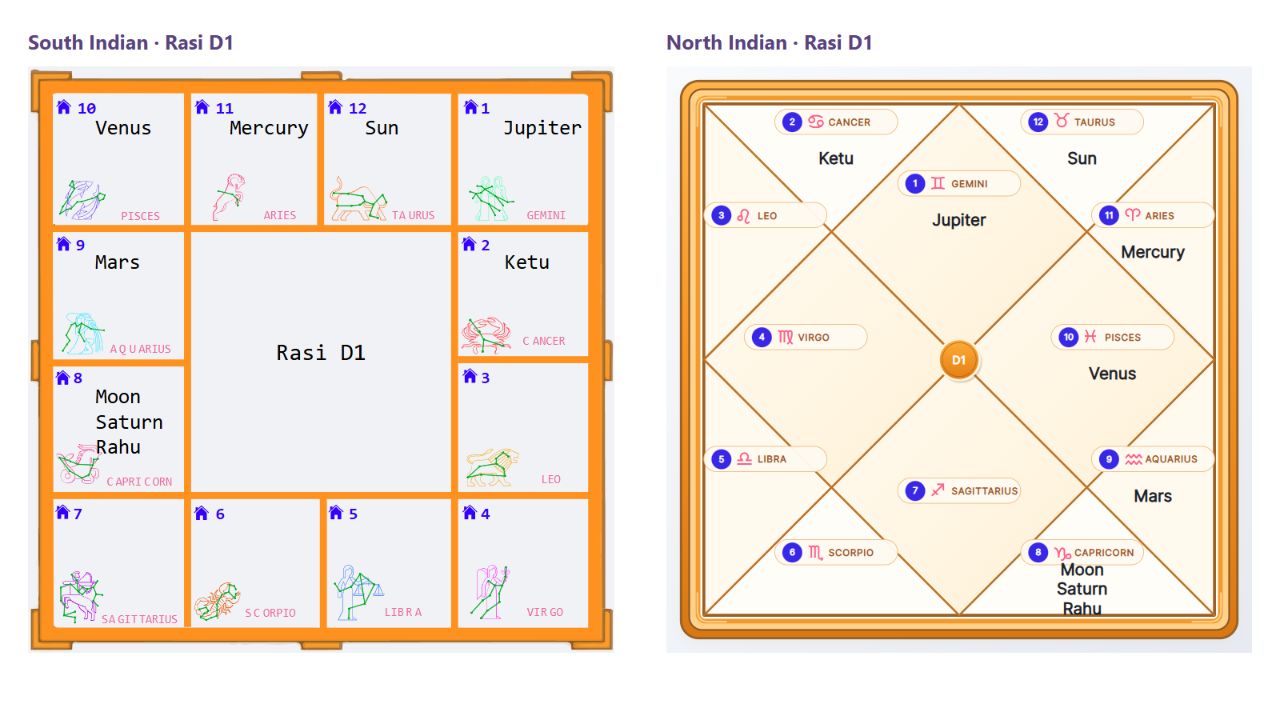
Widget excerpts with live calculation results. Open an image to see it at full size.
Choose your chart layout. Display Rasi D1, Navamsha D9 and other divisional charts for a birth time.
Sarvashtakavarga and Bhinnashtakavarga points across twelve zodiac signs, with totals.
Bring Dasa periods and compatibility reports to your pages, or explore more calculations.
Download the ZIP, then open Plugins → Add New → Upload Plugin in WordPress. Upload and activate VedAstro.
Open Settings → VedAstro. Choose your location, coordinates and timezone, then save. A shared free key is included to get you started.
Add a Shortcode block to any post or page. Paste an example below, preview your page, and make it yours.
South Indian Rasi chart for a birth time. Change chart="RasiD1" to chart="NavamshaD9" for Navamsha.
For birth charts, replace the sample date with your chosen birth date and time: YYYY-MM-DD HH:MM. Times use the timezone saved in Settings.
Add a custom title, or override location, latitude, longitude, timezone and ayanamsa for a particular shortcode. Add format="json" to show formatted data.
For compatibility, the API uses date for the male birth time and partner_date for the female birth time. If birth locations differ, set partner_location, partner_latitude, partner_longitude and partner_timezone.
Yes. The plugin is free and includes a shared API key for trying it out. The free tier allows five API requests per minute. Use your own key from your VedAstro account for your subscription. API service limits apply.
Add a Shortcode block to an existing post or page. Results appear within your theme's layout. The screenshots use a sample theme, so the surrounding fonts and design may look different on your site.
Successful results are reused for 60 minutes by default. You can change this in Settings → VedAstro. Current-time calculations use the current hour; your site's page cache may also affect refresh times.
Download the latest ZIP and upload it through Plugins → Add New → Upload Plugin. Choose WordPress's replacement option when prompted.
Dates, locations and calculation inputs are sent to VedAstro to calculate the results. Details written into public posts, and their results, are public. Keep private birth information out of public pages. Read the privacy policy.
Replace horoscope_predictions and timeurl with vedastro_horoscope and date="YYYY-MM-DD HH:MM". Configure Settings → VedAstro before publishing.
The generic vedastro shortcode supports additional calculation methods and enclosed JSON parameters. Explore the API Builder and complete reference.
Download VedAstro and try your first shortcode.