Free Advanced Node.js Vedic Astrology Library & API
The VedAstro Node.js library gives you instant access to the world's most comprehensive Vedic astrology engine — planet positions, divisional charts, dasa periods, compatibility reports, and AI-powered features, all through a lightweight SDK.

Whether you're building a horoscope app, a matchmaking platform, or a research tool, VedAstro's Node.js library removes every barrier between you and professional-grade Vedic astrology calculations. No complicated setup. No local binaries. No astrology expertise required to get started. Just install the library, set your API key, and start computing — the heavy lifting runs on VedAstro's cloud engine.
What You're Getting
684
Hosted calculations for Vedic astrology applications
47
Ayanamsa systems — Lahiri, Raman, KP, Fagan-Bradley & 43 more
D1–D60
Divisional charts — full Parashari varga system coverage
AI-Powered
Horoscope predictions and classical-text search
Zero Deps
Everything runs in the cloud — your app stays lightweight
Open Source
MIT licensed, community maintained, fully auditable on GitHub
Simple by Design
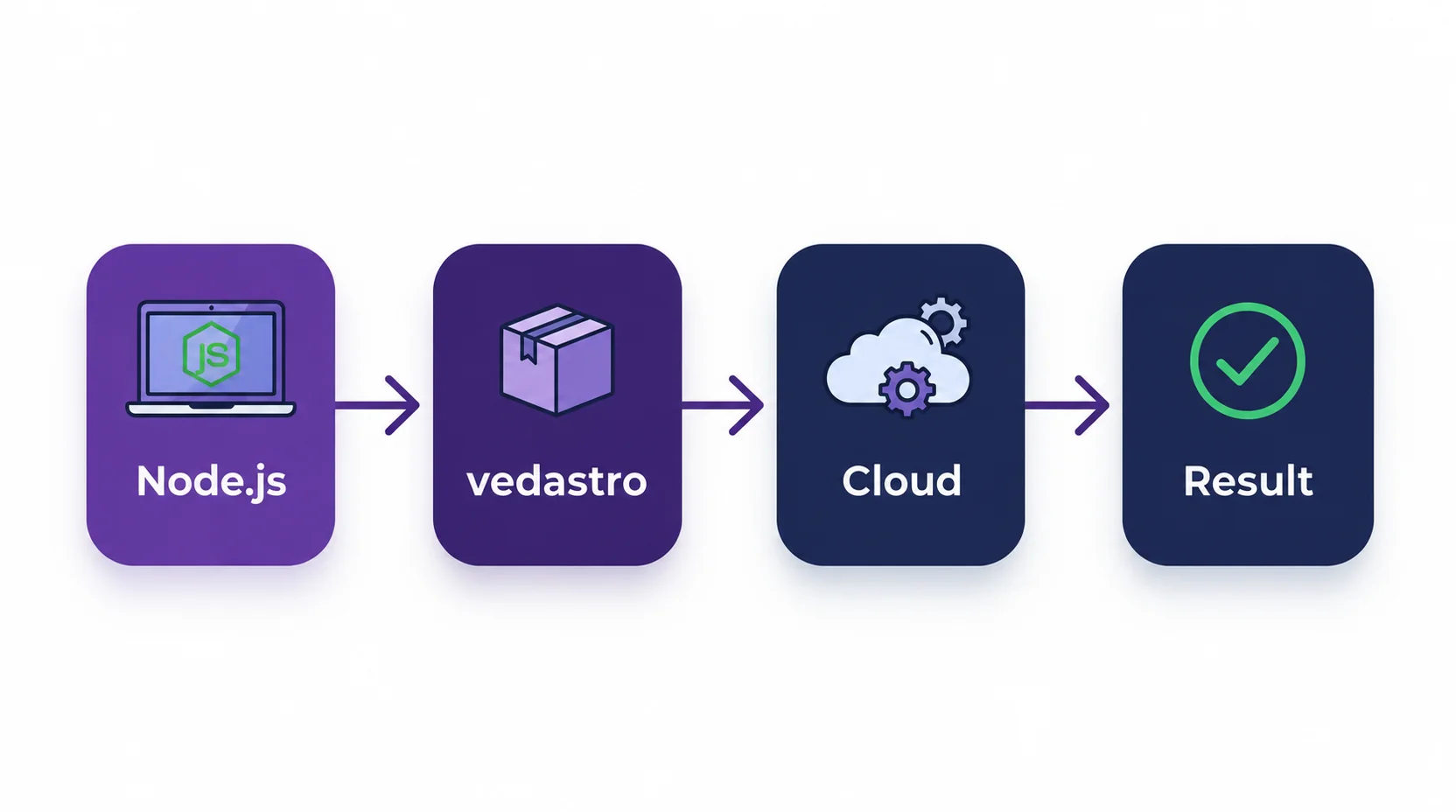
The VedAstro Node.js library is a thin, elegant wrapper around the VedAstro REST API. You write Node.js; the cloud does the calculation.
No heavy installation
The library itself is tiny — everything runs server-side
Always up to date
Calculation improvements roll out on the server automatically
Scales with you
From personal projects to production apps, same code works
Install the Node.js SDK
Node.js 22 or newer and an internet connection
npm install vedastroSave ES module examples as .mjs, or use a project with "type": "module". Every calculation returns a Promise; await it. CommonJS users can use require(), with calls inside an async function.
FreeAPIUser allows 5 requests per minute. Pace multi-call examples or use your subscription key. Locations take longitude before latitude.
Ready to Unlock 684 Calculations?
Get unlimited access for just $1/month — no rate limits, all features included
Instant activation • Cancel anytime • 99.9% uptime guarantee
See It in Action
Start with one Sun-sign calculation using the free key.
import { Calculate, Time, GeoLocation, PlanetName } from 'vedastro';

// 'FreeAPIUser' is the free-tier key (5 requests per minute).
// For a paid key: Calculate.SetAPIKey(process.env.VEDASTRO_API_KEY)
Calculate.SetAPIKey('FreeAPIUser');

// Time format: "HH:MM DD/MM/YYYY +TZ:TZ"
// GeoLocation takes (name, longitude, latitude) — in that order.
const birth = new Time('14:30 25/10/1992 +05:30',
  new GeoLocation('Mumbai', 72.8777, 19.0760));

const sun = await Calculate.PlanetRasiD1Sign(PlanetName.Sun, birth);
console.log(`Sun sign: ${sun.Name}`); // "Libra"
Save as main.mjs and run node main.mjs.
CommonJS
const { Calculate, Time, GeoLocation, PlanetName } = require('vedastro');

async function main() {
  Calculate.SetAPIKey('FreeAPIUser');
  const birth = new Time('14:30 25/10/1992 +05:30',
    new GeoLocation('Mumbai', 72.8777, 19.0760));
  const sun = await Calculate.PlanetRasiD1Sign(PlanetName.Sun, birth);
  console.log(`Sun sign: ${sun.Name}`);
}

main().catch(error => console.error(error.message));
marriage compatibility
Run from the cloned SDK repository; helper files are included there.
/**
 * DEMO: Marriage Compatibility (Kuta system)
 * USE CASE: Check two people's compatibility with the 16-factor Kuta analysis
 * DIFFICULTY: Beginner
 *
 * RUN:
 *   node demo_marriage_compatibility.js
 */
import { Calculate, Time, GeoLocation } from 'vedastro';

try {
  Calculate.SetAPIKey('FreeAPIUser');

  const person1 = new Time('23:40 31/12/1996 +09:00',
    new GeoLocation('Tokyo', 139.83, 35.65));
  const person2 = new Time('14:30 15/06/1997 -05:00',
    new GeoLocation('New York', -74.006, 40.7128));

  console.log('Calculating compatibility... (this may take a few seconds)\n');

  const match = await Calculate.MatchReport(person1, person2);

  // KutaScore is normalised to 100 (the classical total is 36 points).
  console.log(`Overall Compatibility: ${match.KutaScore}/100`);
  console.log(`Status: ${match.Summary.ScoreSummary}\n`);

  console.log('16-Factor Kuta Analysis:\n');
  for (const kuta of match.PredictionList) {
    const mark = kuta.Nature === 'Good' ? '[ok]'
      : kuta.Nature === 'Bad' ? '[x]' : '[!]';
    console.log(`${mark} ${kuta.Name}: ${kuta.Nature}`);
    console.log(`   ${kuta.Info}\n`);
  }

  // INTERPRETING THE SCORE (classical 36-point scale)
  //   33-36  excellent   25-32  good
  //   18-24  average     < 18   poor
  // Nadi Kuta (health & progeny) is traditionally the most heavily weighted.
  // A low score indicates challenges, not destiny — treat it as one input.
} catch (error) {
  console.error(error.message);
  process.exitCode = 1;
}vimshottari dasa
Run from the cloned SDK repository; helper files are included there.
/**
 * DEMO: Vimshottari Dasa Timeline
 * USE CASE: Planetary periods (Mahadasa -> Bhukti -> Antaram) over a date range
 * DIFFICULTY: Intermediate
 *
 * RUN:
 *   node demo_vimshottari_dasa.js
 */
import { Calculate, Time, GeoLocation, DasaType } from 'vedastro';

try {
  Calculate.SetAPIKey('FreeAPIUser');

  const mumbai = new GeoLocation('Mumbai', 72.8777, 19.0760);
  const birth = new Time('14:30 25/10/1992 +05:30', mumbai);

  const start = new Time('00:00 01/01/2020 +05:30', mumbai);
  const end = new Time('23:59 31/12/2030 +05:30', mumbai);

  // levels         = nesting depth (1 = Mahadasa, 2 = +Bhukti, 3 = +Antaram)
  const dasa = await Calculate.DasaAtRange(birth, start, end, DasaType.VimshottariJanma, 3);

  console.log(JSON.stringify(dasa, null, 2));

  // A single moment instead of a range:
  //   await Calculate.DasaAtTime(birth, someTime, DasaType.VimshottariJanma, 3)
  // The whole life span:
  //   await Calculate.DasaForLife(birth, DasaType.VimshottariJanma, 120, 3)
} catch (error) {
  console.error(error.message);
  process.exitCode = 1;
}
Remove rate limits and get instant access to all 684 calculations
684 Calculations Across Every Major Category
| Category | What's Included |
|---|---|
| Positions, longitudes, strengths, aspects, conjunctions, retrograde status | |
| House signs, lords, bhava chart, all house data | |
| D1 through D60 — Navamsha, Drekkana, and all varga charts | |
| Sign-based calculations, planet-in-sign queries | |
| Vimshottari dasa periods with explicit starting rules and configurable depth | |
| Auspicious time finding, event predictions over any date range | |
| Kuta scoring, full compatibility reports, BaZi integration, AI chat analysis | |
| Birth time auto-fill from partial data, natural language horoscope search |
Full method reference: vedastro.org/API.html
47 Ayanamsa Systems — Vedic, Western, and KP
Switch ayanamsa systems with SDK-specific settings
Lahiri
Modern Vedic standard
Raman
Classical Vedic system
Krishnamurti
KP System
Fagan-Bradley
Western sidereal
/**
 * DEMO: Custom Ayanamsa
 * USE CASE: Compare the same chart under different ayanamsa systems
 * DIFFICULTY: Intermediate
 *
 * WHY use_ayanamsa: Node.js is concurrent. A plain global would leak between
 * overlapping requests; use_ayanamsa scopes the value with AsyncLocalStorage.
 *
 * RUN:
 *   node demo_custom_ayanamsa.js
 */
import { Calculate, Time, GeoLocation, Ayanamsa } from 'vedastro';

const sleep = ms => new Promise(resolve => setTimeout(resolve, ms));

try {
  Calculate.SetAPIKey('FreeAPIUser');

  const birth = new Time('23:40 31/12/2010 +08:00',
    new GeoLocation('Tokyo, Japan', 139.83, 35.65));

  const none = Calculate.GetAyanamsa();
  console.log(`Default ayanamsa: ${none ?? '(none set — API default measures as Lahiri)'}`);
  console.log(`Default degree:   ${(await Calculate.AyanamsaDegree(birth)).DegreeMinuteSecond}`);

  for (const ayanamsa of [Ayanamsa.Lahiri, Ayanamsa.Raman]) {
    await sleep(12_500);
    await Calculate.use_ayanamsa(ayanamsa, async () => {
      const degree = (await Calculate.AyanamsaDegree(birth)).DegreeMinuteSecond;
      console.log(`${ayanamsa}: ${degree}`);
    });
  }

  // The scoped value is gone once the callback returns.
  console.log(`After scopes:     ${Calculate.GetAyanamsa() ?? '(none set)'}`);
} catch (error) {
  console.error(error.message);
  process.exitCode = 1;
}
Run this example inside the cloned repository. View source.
Start Free. Scale When You're Ready.
Free
Rate-limited
'FreeAPIUser'No signup required — ideal for exploration and development
Subscriber
Unlimited access
High-speed access to all 684 calculations for production apps
Calculate.SetAPIKey('your-key-here');Ready-to-Run Examples
Clone the repository to run these examples with their included helpers. Expand an example to read and copy its source.
/**
 * DEMO: All Astro Data
 * USE CASE: Dump the complete planet and house dataset for a chart
 * DIFFICULTY: Intermediate
 *
 * AllPlanetData / AllHouseData return large payloads. This demo fetches a few
 * of them and writes the combined result to JSON so you can inspect them.
 *
 * RUN:
 *   node demo_all_astro_data.js
 */
import fs from 'node:fs';
import { Calculate, Time, GeoLocation, PlanetName } from 'vedastro';

const sleep = ms => new Promise(resolve => setTimeout(resolve, ms));

try {
  Calculate.SetAPIKey('FreeAPIUser');

  const birth = new Time('14:30 25/10/1992 +05:30',
    new GeoLocation('Mumbai', 72.8777, 19.0760));

  const report = {};

  // Everything about the Sun, in one call
  report.sun = await Calculate.AllPlanetData(PlanetName.Sun, birth);
  console.log(`Sun data keys: ${Object.keys(report.sun ?? {}).join(', ')}`);
  await sleep(12_500);

  // Everything about the first house
  report.house1 = await Calculate.AllHouseData(1, birth);
  console.log(`House 1 data keys: ${Object.keys(report.house1 ?? {}).join(', ')}`);
  await sleep(12_500);

  // The whole moment: panchanga, positions, dasa and more
  report.time = await Calculate.AllTimeData(birth);
  console.log(`Time data keys: ${Object.keys(report.time ?? {}).join(', ')}`);

  fs.writeFileSync('astro_data.json', JSON.stringify(report, null, 2));
  console.log('\nWrote astro_data.json');
} catch (error) {
  console.error(error.message);
  process.exitCode = 1;
}/**
* DEMO: Batch Processing
* USE CASE: Process many charts without tripping the free tier's rate limit
* DIFFICULTY: Advanced
*
* The free tier allows 5 requests per minute, so a naive Promise.all() over 50
* charts will mostly fail. Two ways to cope are shown below:
* A. A throttled queue (works on the free tier, just slower)
* B. Concurrency with retry (works well on a premium key)
*
* RUN:
* node demo_batch_processing.js
*/
import { Calculate, Time, GeoLocation, PlanetName } from 'vedastro';
const sleep = ms => new Promise(resolve => setTimeout(resolve, ms));
// --- A minimal token-bucket style throttle -------------------------------
// Allows at most `limit` calls per `windowMs`, keeping a minimum gap between
// consecutive calls so the server's sliding window never fills up.
function createThrottle(limit, windowMs) {
const gap = Math.ceil(windowMs / limit);
let last = 0;
return async function throttle() {
const wait = last + gap - Date.now();
if (wait > 0) await sleep(wait);
last = Date.now();
};
}
const people = [
{ name: 'Mumbai', time: '14:30 25/10/1992 +05:30', lon: 72.8777, lat: 19.0760 },
{ name: 'Tokyo', time: '23:40 31/12/2010 +08:00', lon: 139.83, lat: 35.65 },
{ name: 'New York', time: '09:00 15/06/1997 -05:00', lon: -74.006, lat: 40.7128 }
];
try {
Calculate.SetAPIKey('FreeAPIUser');
// --- A. Throttled sequential processing -------------------------------
const throttle = createThrottle(5, 60_000); // 5 calls per minute
const results = [];
for (const person of people) {
await throttle();
const birth = new Time(person.time, new GeoLocation(person.name, person.lon, person.lat));
const sun = await Calculate.PlanetRasiD1Sign(PlanetName.Sun, birth);
results.push({ place: person.name, sunSign: sun.Name });
console.log(`${person.name.padEnd(10)} Sun in ${sun.Name}`);
}
console.log(`\nProcessed ${results.length} charts.`);
console.log(JSON.stringify(results, null, 2));
// --- B. Concurrency with retry (for a premium key) --------------------
// Uncomment if you have a paid key, which allows far more calls per minute.
//
// async function withRetry(fn, attempts = 3) {
// for (let i = 1; i <= attempts; i += 1) {
// try { return await fn(); }
// catch (error) {
// if (i === attempts) throw error;
// await sleep(15_000);
// }
// }
// }
//
// const charts = await Promise.all(people.map(person => withRetry(async () => {
// const birth = new Time(person.time, new GeoLocation(person.name, person.lon, person.lat));
// return { place: person.name, ...(await Calculate.AllPlanetData(PlanetName.Sun, birth)) };
// })));
//
// Tip: for very large jobs, cache results by chart so a retry or a re-run
// does not spend another API call.
// NOTE: the throttle above paces requests but does not persist them. For a
// long job, checkpoint `results` to disk as you go.
} catch (error) {
console.error(error.message);
process.exitCode = 1;
}/**
* DEMO: Birth Chart Basics
* USE CASE: Display the Sun, Moon and Ascendant ("the big three") signs
* DIFFICULTY: Beginner
*
* RUN:
* node demo_birth_chart_basics.js
*/
import { Calculate, Time, GeoLocation, PlanetName } from 'vedastro';
const sleep = ms => new Promise(resolve => setTimeout(resolve, ms));
try {
Calculate.SetAPIKey('FreeAPIUser');
const birth = new Time('14:30 25/10/1992 +05:30',
new GeoLocation('Mumbai', 72.8777, 19.0760));
// The free tier allows 5 calls per minute, so pause between calls.
const sun = await Calculate.PlanetRasiD1Sign(PlanetName.Sun, birth);
console.log(`Sun: ${sun.Name}`);
await sleep(12_500);
const moon = await Calculate.PlanetRasiD1Sign(PlanetName.Moon, birth);
console.log(`Moon: ${moon.Name}`);
await sleep(12_500);
// HouseSignName takes a house NUMBER (1 = first house / ascendant).
const ascendant = await Calculate.HouseSignName(1, birth);
console.log(`Rising: ${ascendant}`);
} catch (error) {
console.error(error.message);
process.exitCode = 1;
}/**
* DEMO: Current Planetary Positions
* USE CASE: Get today's planetary positions for any location
* DIFFICULTY: Beginner
*
* RUN:
* node demo_current_planets.js
*/
import { Calculate, Time, GeoLocation, PlanetName } from 'vedastro';
const sleep = ms => new Promise(resolve => setTimeout(resolve, ms));
try {
Calculate.SetAPIKey('FreeAPIUser');
const now = new Date();
const location = new GeoLocation('London', -0.1278, 51.5074);
// Build a Time from "now". Note: Date's month is 0-based, Time's is not.
const current = new Time({
hour: now.getHours(), minute: now.getMinutes(),
day: now.getDate(), month: now.getMonth() + 1, year: now.getFullYear(),
offset: '+00:00', geolocation: location
});
const planets = [PlanetName.Sun, PlanetName.Moon, PlanetName.Mars,
PlanetName.Mercury, PlanetName.Jupiter, PlanetName.Venus,
PlanetName.Saturn, PlanetName.Rahu, PlanetName.Ketu];
console.log('Current Planetary Positions:');
for (const planet of planets) {
const sign = await Calculate.PlanetRasiD1Sign(planet, current);
const star = await Calculate.PlanetConstellation(planet, current);
console.log(` ${planet}: ${sign.Name} in ${star}`);
await sleep(12_500); // free tier: 5 calls/min, and this loop makes 2 each
}
} catch (error) {
console.error(error.message);
process.exitCode = 1;
}/**
* DEMO: Custom Ayanamsa
* USE CASE: Compare the same chart under different ayanamsa systems
* DIFFICULTY: Intermediate
*
* WHY use_ayanamsa: Node.js is concurrent. A plain global would leak between
* overlapping requests; use_ayanamsa scopes the value with AsyncLocalStorage.
*
* RUN:
* node demo_custom_ayanamsa.js
*/
import { Calculate, Time, GeoLocation, Ayanamsa } from 'vedastro';
const sleep = ms => new Promise(resolve => setTimeout(resolve, ms));
try {
Calculate.SetAPIKey('FreeAPIUser');
const birth = new Time('23:40 31/12/2010 +08:00',
new GeoLocation('Tokyo, Japan', 139.83, 35.65));
const none = Calculate.GetAyanamsa();
console.log(`Default ayanamsa: ${none ?? '(none set — API default measures as Lahiri)'}`);
console.log(`Default degree: ${(await Calculate.AyanamsaDegree(birth)).DegreeMinuteSecond}`);
for (const ayanamsa of [Ayanamsa.Lahiri, Ayanamsa.Raman]) {
await sleep(12_500);
await Calculate.use_ayanamsa(ayanamsa, async () => {
const degree = (await Calculate.AyanamsaDegree(birth)).DegreeMinuteSecond;
console.log(`${ayanamsa}: ${degree}`);
});
}
// The scoped value is gone once the callback returns.
console.log(`After scopes: ${Calculate.GetAyanamsa() ?? '(none set)'}`);
} catch (error) {
console.error(error.message);
process.exitCode = 1;
}/**
* DEMO: Daily Panchanga
* USE CASE: Get today's Tithi, Nakshatra, Yoga and Karana for a location
* DIFFICULTY: Beginner
*
* Panchanga is location-sensitive because it is reckoned from local sunrise.
*
* RUN:
* node demo_daily_panchanga.js
*/
import { Calculate, Time, GeoLocation } from 'vedastro';
const sleep = ms => new Promise(resolve => setTimeout(resolve, ms));
try {
Calculate.SetAPIKey('FreeAPIUser');
const now = new Date();
const location = new GeoLocation('Mumbai', 72.8777, 19.0760);
const today = new Time({
hour: now.getHours(), minute: now.getMinutes(),
day: now.getDate(), month: now.getMonth() + 1, year: now.getFullYear(),
offset: '+05:30', geolocation: location
});
const tithi = await Calculate.LunarDay(today);
await sleep(12_500);
const nakshatra = await Calculate.MoonConstellation(today);
await sleep(12_500);
const yoga = await Calculate.NithyaYoga(today);
await sleep(12_500);
const karana = await Calculate.Karana(today);
console.log(`Panchanga for ${now.toDateString()}`);
console.log(`Tithi: ${tithi}`);
console.log(`Nakshatra: ${nakshatra}`);
console.log(`Yoga: ${yoga}`);
console.log(`Karana: ${karana}`);
} catch (error) {
console.error(error.message);
process.exitCode = 1;
}/**
* DEMO: Divisional Charts (vargas)
* USE CASE: Read planetary positions in D9, D10 and D12 charts
* DIFFICULTY: Intermediate
*
* A varga divides each sign into finer parts. D9 (Navamsha) is used for
* marriage and dharma, D10 (Dashamsha) for career, D12 (Dwadashamsha) for
* parents. A planet can sit in a different sign in each varga.
*
* RUN:
* node demo_divisional_charts.js
*/
import { Calculate, Time, GeoLocation, PlanetName, ChartType } from 'vedastro';
const sleep = ms => new Promise(resolve => setTimeout(resolve, ms));
try {
Calculate.SetAPIKey('FreeAPIUser');
const birth = new Time('14:30 25/10/1992 +05:30',
new GeoLocation('Mumbai', 72.8777, 19.0760));
console.log('Sun sign across divisional charts:\n');
// D1 (Rasi) for comparison
const d1 = await Calculate.PlanetRasiD1Sign(PlanetName.Sun, birth);
console.log(` D1 (Rasi): ${d1.Name}`);
await sleep(12_500);
// D9 (Navamsha)
const d9 = await Calculate.PlanetNavamshaD9Sign(PlanetName.Sun, birth);
console.log(` D9 (Navamsha): ${d9.Name}`);
await sleep(12_500);
// D10 (Dashamsha) — career
const d10 = await Calculate.PlanetDashamamshaD10Sign(PlanetName.Sun, birth);
console.log(` D10 (Dashamsha): ${d10.Name}`);
await sleep(12_500);
// D12 (Dwadashamsha) — parents
const d12 = await Calculate.PlanetDwadashamshaD12Sign(PlanetName.Sun, birth);
console.log(` D12 (Dwadashamsha): ${d12.Name}`);
// Whole-chart variants return every house at once:
// await Calculate.AllHouseNavamshaSign(birth)
// The ChartType enum lists the 17 vargas used by the SVG chart methods:
console.log(`\nAvailable ChartType values: ${Object.keys(ChartType).join(', ')}`);
} catch (error) {
console.error(error.message);
process.exitCode = 1;
}/**
* DEMO: Error Handling
* USE CASE: Handle API failures, rate limits and bad input correctly
* DIFFICULTY: Intermediate
*
* Two kinds of failure exist:
* 1. Client-side validation -> throws synchronously (bad ayanamsa, bad args)
* 2. API/network failure -> rejects the returned Promise
*
* RUN:
* node demo_error_handling.js
*/
import { Calculate, Time, GeoLocation, Ayanamsa } from 'vedastro';
const sleep = ms => new Promise(resolve => setTimeout(resolve, ms));
try {
Calculate.SetAPIKey('FreeAPIUser');
const birth = new Time('14:30 25/10/1992 +05:30',
new GeoLocation('Mumbai', 72.8777, 19.0760));
// 1. Successful call
try {
const sun = await Calculate.PlanetRasiD1Sign('Sun', birth);
console.log(`[ok] Sun in ${sun.Name}`);
} catch (error) {
console.error(`[fail] ${error.message}`);
}
await sleep(12_500);
// 2. Invalid ayanamsa -> client-side TypeError, no network call made
try {
Calculate.SetAyanamsa('NotARealAyanamsa');
} catch (error) {
console.log(`[validation] ${error.constructor.name}: ${error.message}`);
}
// The bad value was rejected, so the previous setting is untouched
console.log(`[validation] ayanamsa still: ${Calculate.GetAyanamsa() ?? '(none set)'}`);
await sleep(12_500);
// 3. Bad coordinates reach the API and come back as a rejection
try {
const impossible = new Time('14:30 25/10/1992 +05:30',
new GeoLocation('Nowhere', 999, 999));
const result = await Calculate.PlanetRasiD1Sign('Sun', impossible);
console.log(`[unexpected] ${JSON.stringify(result)}`);
} catch (error) {
console.log(`[api] ${error.message.split('\n')[0]}`);
}
// 4. A tiny retry helper for transient failures
async function withRetry(fn, attempts = 3, delayMs = 12_500) {
for (let attempt = 1; attempt <= attempts; attempt += 1) {
try {
return await fn();
} catch (error) {
if (attempt === attempts) throw error;
console.log(` retry ${attempt}/${attempts - 1} after: ${error.message.split('\n')[0]}`);
await sleep(delayMs);
}
}
}
await sleep(12_500);
const moon = await withRetry(() => Calculate.PlanetRasiD1Sign('Moon', birth));
console.log(`[retry ok] Moon in ${moon.Name}`);
// Ayanamsa is validated, so keep a valid choice for subsequent calls
Calculate.SetAyanamsa(Ayanamsa.Lahiri);
} catch (error) {
console.error(error.message);
process.exitCode = 1;
}/**
* DEMO: Marriage Compatibility (Kuta system)
* USE CASE: Check two people's compatibility with the 16-factor Kuta analysis
* DIFFICULTY: Beginner
*
* RUN:
* node demo_marriage_compatibility.js
*/
import { Calculate, Time, GeoLocation } from 'vedastro';
try {
Calculate.SetAPIKey('FreeAPIUser');
const person1 = new Time('23:40 31/12/1996 +09:00',
new GeoLocation('Tokyo', 139.83, 35.65));
const person2 = new Time('14:30 15/06/1997 -05:00',
new GeoLocation('New York', -74.006, 40.7128));
console.log('Calculating compatibility... (this may take a few seconds)\n');
const match = await Calculate.MatchReport(person1, person2);
// KutaScore is normalised to 100 (the classical total is 36 points).
console.log(`Overall Compatibility: ${match.KutaScore}/100`);
console.log(`Status: ${match.Summary.ScoreSummary}\n`);
console.log('16-Factor Kuta Analysis:\n');
for (const kuta of match.PredictionList) {
const mark = kuta.Nature === 'Good' ? '[ok]'
: kuta.Nature === 'Bad' ? '[x]' : '[!]';
console.log(`${mark} ${kuta.Name}: ${kuta.Nature}`);
console.log(` ${kuta.Info}\n`);
}
// INTERPRETING THE SCORE (classical 36-point scale)
// 33-36 excellent 25-32 good
// 18-24 average < 18 poor
// Nadi Kuta (health & progeny) is traditionally the most heavily weighted.
// A low score indicates challenges, not destiny — treat it as one input.
} catch (error) {
console.error(error.message);
process.exitCode = 1;
}/**
* DEMO: Numerology Calculator (Chaldean system)
* USE CASE: Birth number, destiny number and name-number predictions
* DIFFICULTY: Beginner
*
* RUN:
* node demo_numerology_calculator.js
*/
import { Calculate, Time, GeoLocation } from 'vedastro';
const sleep = ms => new Promise(resolve => setTimeout(resolve, ms));
try {
Calculate.SetAPIKey('FreeAPIUser');
const name = 'John Doe';
const birth = new Time('14:30 25/10/1992 +05:30',
new GeoLocation('Mumbai', 72.8777, 19.0760));
console.log(`Numerology for ${name}`);
console.log('-'.repeat(50));
// Numbers derived from the birth date alone
const birthNumber = await Calculate.BirthNumber(birth);
await sleep(12_500);
const destinyNumber = await Calculate.DestinyNumber(birth);
console.log(`Birth number : ${birthNumber}`);
console.log(`Destiny number : ${destinyNumber}`);
await sleep(12_500);
// Name number (Chaldean), plus ruling planet and interpretation
const prediction = await Calculate.NameNumberPrediction(name);
console.log('-'.repeat(50));
console.log(`Name : ${name}`);
console.log(`Number : ${prediction.Number}`);
console.log(`Root number : ${prediction.RootNumber}`);
console.log(`Ruling planet : ${prediction.Planet}`);
// 'Prediction' is HTML formatted — strip tags for plain terminal output
const plain = String(prediction.Prediction).replace(/<[^>]+>/g, '');
console.log(`Interpretation : ${plain.slice(0, 400)}`);
// NEXT STEPS
// - Compare spellings of a name: each call is one API request
// - Combine with the birth chart: await Calculate.PlanetRasiD1Sign('Sun', birth)
} catch (error) {
console.error(error.message);
process.exitCode = 1;
}/**
* DEMO: Quick Start - Your First Vedic Astrology Calculation
* USE CASE: Learn the absolute basics in a few lines of code
* DIFFICULTY: Beginner
*
* RUN:
* node demo_quick_start.js
*
* EXPECTED OUTPUT:
* Sun Sign: Libra
*/
import { Calculate, Time, GeoLocation, PlanetName } from 'vedastro';
try {
// Step 1: Set API Key
// Free tier: 'FreeAPIUser' (5 requests per minute)
// Premium: get your key from https://vedastro.org/API.html
Calculate.SetAPIKey('FreeAPIUser');
// Step 2: Define birth time and location
// Format: "HH:MM DD/MM/YYYY +TZ:TZ" — note GeoLocation(name, longitude, latitude)
const birth = new Time('14:30 25/10/1992 +05:30',
new GeoLocation('Mumbai', 72.8777, 19.0760));
// Step 3: Make your first calculation
const sun = await Calculate.PlanetRasiD1Sign(PlanetName.Sun, birth);
// Step 4: Display the result
console.log(`Sun Sign: ${sun.Name}`);
// NEXT STEPS
// - Moon sign: await Calculate.PlanetRasiD1Sign(PlanetName.Moon, birth)
// - Ascendant: await Calculate.HouseSignName(1, birth)
// - More examples: see README.md
} catch (error) {
console.error(error.message);
process.exitCode = 1;
}/**
* DEMO: Semantic Search of Classical Texts (RAG)
* USE CASE: Ask a plain-English question, get the most relevant passages from
* classical Vedic books — no exact keywords required
* DIFFICULTY: Intermediate
*
* The returned passages are designed to be dropped into an LLM prompt, which
* is how you build a *cited* astrology chatbot.
*
* RUN:
* node demo_rag_vedic_books.js
*/
import { Calculate } from 'vedastro';
const sleep = ms => new Promise(resolve => setTimeout(resolve, ms));
try {
Calculate.SetAPIKey('FreeAPIUser');
// Which classical texts are searchable?
const texts = await Calculate.GetAvailableSourceTexts();
console.log(`Searchable texts (${texts.length}):`);
for (const t of texts) console.log(` - ${t}`);
console.log('');
await sleep(12_500);
// Natural-language semantic search across all texts
const passages = await Calculate.SearchSourceText('effects of Saturn in the 7th house');
for (const p of passages) {
// lower score = closer match, so invert it into a relevance percentage
const relevance = (1 - (p.score ?? 1)) * 100;
console.log(`${p.sourceName} p.${p.pageNumber} (${relevance.toFixed(0)}%)`);
console.log(` ${p.text}\n`);
}
await sleep(12_500);
// Narrow to one book and tune the knobs.
// Signature is POSITIONAL: (query, topK, sourceName, contextSize)
const focused = await Calculate.SearchSourceText(
'results of Jupiter aspecting the Moon',
3,
'Hindu-Predictive-Astrology',
800
);
console.log(`Focused search returned ${focused.length} passage(s).`);
// BUILDING A CITED CHATBOT
// 1. await Calculate.SearchSourceText(userQuestion)
// 2. Format each hit as a numbered source with its book + page
// 3. Ask your LLM to answer using ONLY those passages, citing [1], [2], ...
} catch (error) {
console.error(error.message);
process.exitCode = 1;
}/**
* DEMO: SVG Chart Rendering
* USE CASE: Render North/South Indian style charts as SVG
* DIFFICULTY: Intermediate
*
* The chart methods resolve to an SVG *string*, not JSON — you can write it to
* a file, inline it in HTML, or convert it to PNG.
*
* RUN:
* node demo_svg_charts.js
* # then open south_indian_chart.svg in a browser
*/
import fs from 'node:fs';
import { Calculate, Time, GeoLocation, ChartType } from 'vedastro';
const sleep = ms => new Promise(resolve => setTimeout(resolve, ms));
try {
Calculate.SetAPIKey('FreeAPIUser');
const birth = new Time('14:30 25/10/1992 +05:30',
new GeoLocation('Mumbai', 72.8777, 19.0760));
// Second argument is a ChartType (defaults to Rasi D1)
const south = await Calculate.SouthIndianChart(birth, ChartType.RasiD1);
console.log(`South Indian chart: ${typeof south}, ${south.length} chars of SVG`);
fs.writeFileSync('south_indian_chart.svg', south);
await sleep(12_500);
const north = await Calculate.NorthIndianChart(birth, ChartType.NavamshaD9);
console.log(`North Indian chart: ${typeof north}, ${north.length} chars of SVG`);
fs.writeFileSync('north_indian_chart.svg', north);
await sleep(12_500);
// SkyChart is the circular Western/Vedic style chart
const sky = await Calculate.SkyChart(birth);
console.log(`Sky chart: ${typeof sky}, ${sky.length} chars of SVG`);
fs.writeFileSync('sky_chart.svg', sky);
console.log('\nWrote south_indian_chart.svg, north_indian_chart.svg, sky_chart.svg');
} catch (error) {
console.error(error.message);
process.exitCode = 1;
}/**
* DEMO: Vimshottari Dasa Timeline
* USE CASE: Planetary periods (Mahadasa -> Bhukti -> Antaram) over a date range
* DIFFICULTY: Intermediate
*
* RUN:
* node demo_vimshottari_dasa.js
*/
import { Calculate, Time, GeoLocation, DasaType } from 'vedastro';
try {
Calculate.SetAPIKey('FreeAPIUser');
const mumbai = new GeoLocation('Mumbai', 72.8777, 19.0760);
const birth = new Time('14:30 25/10/1992 +05:30', mumbai);
const start = new Time('00:00 01/01/2020 +05:30', mumbai);
const end = new Time('23:59 31/12/2030 +05:30', mumbai);
// levels = nesting depth (1 = Mahadasa, 2 = +Bhukti, 3 = +Antaram)
const dasa = await Calculate.DasaAtRange(birth, start, end, DasaType.VimshottariJanma, 3);
console.log(JSON.stringify(dasa, null, 2));
// A single moment instead of a range:
// await Calculate.DasaAtTime(birth, someTime, DasaType.VimshottariJanma, 3)
// The whole life span:
// await Calculate.DasaForLife(birth, DasaType.VimshottariJanma, 120, 3)
} catch (error) {
console.error(error.message);
process.exitCode = 1;
}/**
* DEMO: TypeScript Usage
* USE CASE: Get full type-safety and autocompletion from the bundled types
* DIFFICULTY: Intermediate
*
* The package ships generated declarations for all 684 methods, so editors
* autocomplete method names, argument names and enum values.
*
* This file is an ES module (the package sets "type": "module"), so it stays
* consistent with the .js demos next to it.
*
* RUN:
* npx tsc --noEmit demo_typescript.ts --module nodenext --moduleResolution nodenext --target es2022
*
* To execute it, Node 22+ can strip the types directly:
* node --experimental-strip-types demo_typescript.ts
*/
import { Calculate, Time, GeoLocation, PlanetName, Ayanamsa } from 'vedastro';
import type { JsonValue } from 'vedastro';
async function main(): Promise<void> {
Calculate.SetAPIKey('FreeAPIUser');
const birth: Time = new Time('14:30 25/10/1992 +05:30',
new GeoLocation('Mumbai', 72.8777, 19.0760));
// The compiler knows PlanetName.Sun is valid and typo'd members are not.
const sun: JsonValue = await Calculate.PlanetRasiD1Sign(PlanetName.Sun, birth);
// Payload methods return JsonValue, so narrow before reading fields.
const name = (sun as { Name?: string }).Name ?? 'unknown';
console.log(`Sun Sign: ${name}`);
// Ayanamsa members are also typed
Calculate.SetAyanamsa(Ayanamsa.Lahiri);
console.log(`Ayanamsa: ${Calculate.GetAyanamsa() ?? '(none set)'}`);
// use_ayanamsa preserves the callback's return type
const degree = await Calculate.use_ayanamsa(Ayanamsa.Raman, async () => {
const result = await Calculate.AyanamsaDegree(birth) as { DegreeMinuteSecond?: string };
return result.DegreeMinuteSecond ?? '';
});
console.log(`Raman ayanamsa: ${degree}`);
}
main().catch((error: unknown) => {
console.error(error instanceof Error ? error.message : String(error));
});
Open Source at Its Core
The VedAstro Node.js library is fully open source under the MIT License. You can read the code, verify every API call, and contribute improvements back to the community. The library is maintained alongside the main VedAstro engine — when new calculations are added to the API, the Node.js wrapper updates to match.
Note: Calculator wrappers are generated to follow the hosted API. See the repository for source, generator guidance, and contribution instructions.
Ready to Build?
Install the library, try the free tier, and see how fast you can go from zero to a working Vedic astrology application. When your project is ready for the real world, your API key is one click away.
npm install vedastroMade and funded by users — Support VedAstro