Free Advanced Java Vedic Astrology Library & API
The VedAstro Java library gives you instant access to the world's most comprehensive Vedic astrology engine — planet positions, divisional charts, dasa periods, compatibility reports, and AI-powered features, all through a lightweight SDK.
Whether you're building a horoscope app, a matchmaking platform, or a research tool, VedAstro's Java library removes every barrier between you and professional-grade Vedic astrology calculations. No complicated setup. No local binaries. No astrology expertise required to get started. Just install the library, set your API key, and start computing — the heavy lifting runs on VedAstro's cloud engine.
What You're Getting
684
Hosted calculations for Vedic astrology applications
47
Ayanamsa systems — Lahiri, Raman, KP, Fagan-Bradley & 43 more
D1–D60
Divisional charts — full Parashari varga system coverage
AI-Powered
Horoscope predictions and classical-text search
Zero Deps
Everything runs in the cloud — your app stays lightweight
Open Source
MIT licensed, community maintained, fully auditable on GitHub
Simple by Design
The VedAstro Java library is a thin, elegant wrapper around the VedAstro REST API. You write Java; the cloud does the calculation.
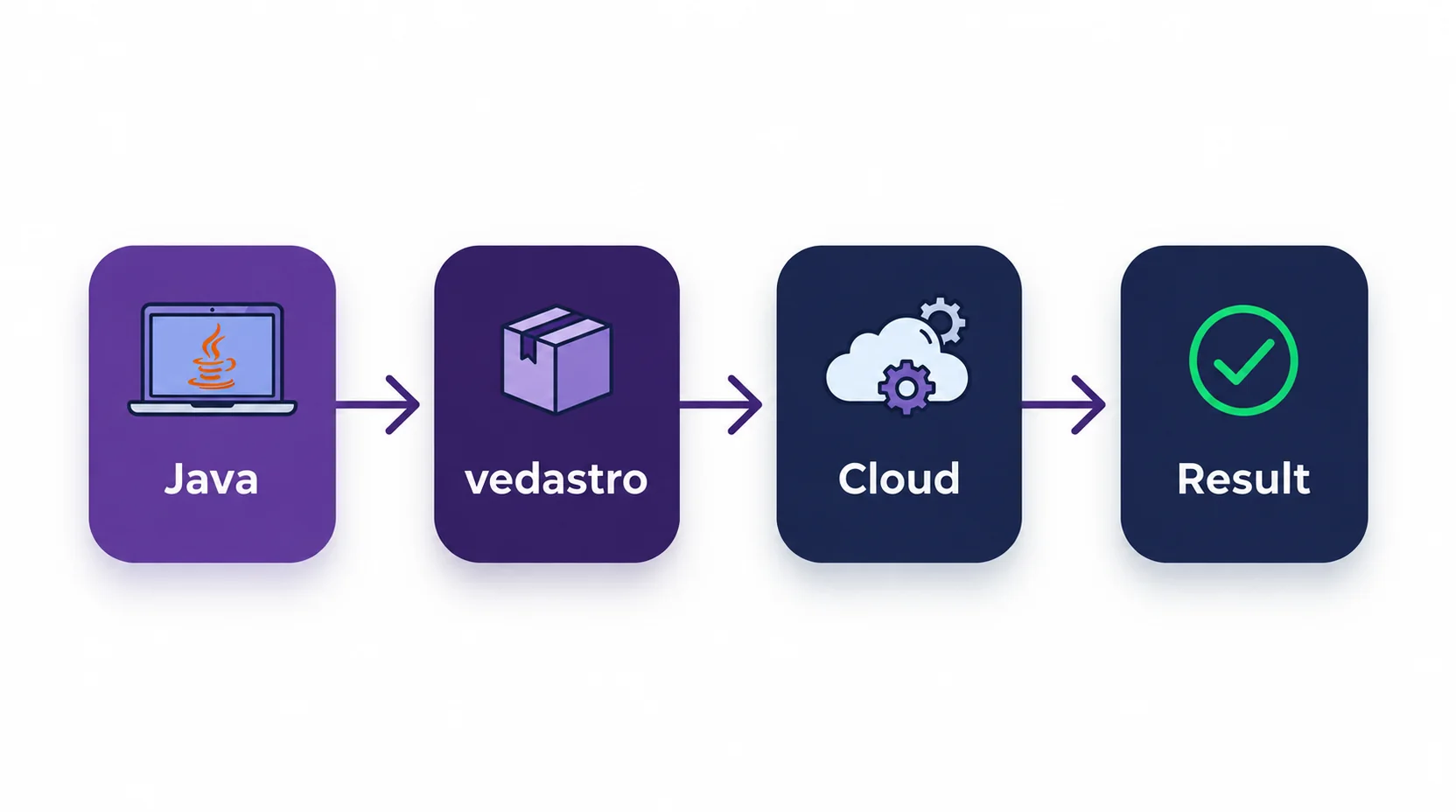
No heavy installation
The library itself is tiny — everything runs server-side
Always up to date
Calculation improvements roll out on the server automatically
Scales with you
From personal projects to production apps, same code works
Install the Java SDK
Java 21 or newer and an internet connection
git clone https://github.com/VedAstro/VedAstro.Java.git
cd VedAstro.Java
./mvnw install -DskipTests
After installing locally, add the dependency to your application.
<dependency>
  <groupId>org.vedastro</groupId>
  <artifactId>vedastro</artifactId>
  <version>1.0.0</version>
</dependency>
Gradle (read the locally installed artifact):
repositories {
    mavenLocal()
    mavenCentral()
}
dependencies {
    implementation 'org.vedastro:vedastro:1.0.0'
}
Build and install from GitHub first: this artifact is not currently published on Maven Central. On Windows, use mvnw.cmd instead of ./mvnw. Calculations return dynamic Object payloads; read them using Calculate.name or Json helpers. Repository demos use DemoSupport and run from the cloned Maven project.
FreeAPIUser allows 5 requests per minute. Pace multi-call examples or use your subscription key. Locations take longitude before latitude.
Ready to Unlock 684 Calculations?
Get unlimited access for just $1/month — no rate limits, all features included
Instant activation • Cancel anytime • 99.9% uptime guarantee
See It in Action
Start with one Sun-sign calculation using the free key.
import org.vedastro.Calculate;
import org.vedastro.GeoLocation;
import org.vedastro.Time;
import org.vedastro.calculate.PlanetName;

public class Main {
    public static void main(String[] args) {
        // 'FreeAPIUser' is the free-tier key (5 requests per minute).
        // For a paid key, set VEDASTRO_API_KEY and read it with System.getenv.
        Calculate.setApiKey("FreeAPIUser");

        // Time format: "HH:MM DD/MM/YYYY +TZ:TZ".
        // GeoLocation takes the name, then LONGITUDE, then latitude.
        Time birth = Time.of("14:30 25/10/1992 +05:30",
                GeoLocation.of("Mumbai", 72.8777, 19.0760));

        Object result = Calculate.planetRasiD1Sign(PlanetName.SUN, birth);
        System.out.println("Sun Sign: " + Calculate.name(result)); // Libra
    }
}
Save as src/main/java/Main.java in your Maven application, then run mvn compile exec:java -Dexec.mainClass=Main.
MarriageCompatibility
Run from the cloned SDK repository; helper files are included there.
package org.vedastro.demos;

import java.util.List;
import org.vedastro.GeoLocation;
import org.vedastro.Json;
import org.vedastro.Time;
import org.vedastro.VedAstroClient;

/**
 * DEMO: Marriage compatibility - the 16-factor Kuta analysis.
 *
 * <p>USE CASE: check whether two birth charts are considered compatible
 * <p>DIFFICULTY: Beginner
 *
 * <p>RUN: {@code mvn -q exec:java -Dexec.mainClass=org.vedastro.demos.MarriageCompatibility}
 */
public final class MarriageCompatibility {

    private MarriageCompatibility() {
    }

    public static void main(String[] args) {
        VedAstroClient client = DemoSupport.client();

        Time person1 = Time.of("23:40 31/12/1996 +09:00",
                GeoLocation.of("Tokyo", 139.83, 35.65));
        Time person2 = Time.of("14:30 15/06/1997 -05:00",
                GeoLocation.of("New York", -74.006, 40.7128));

        System.out.println("Calculating compatibility... (this may take a few seconds)");
        Object report = client.calculate().matchReport(person1, person2);
        var match = Json.asMap(report);

        System.out.println("Overall compatibility: " + match.get("KutaScore") + "/100");
        System.out.println("Status: " + Json.asMap(match.get("Summary")).get("ScoreSummary"));
        System.out.println();

        // Each factor carries a Nature of Good, Bad, or Neutral.
        List<Object> predictions = Json.asList(match.get("PredictionList"));
        System.out.println(predictions.size() + "-factor Kuta analysis:");
        for (Object item : predictions) {
            var kuta = Json.asMap(item);
            System.out.println("  " + marker(Json.asString(kuta.get("Nature"), ""))
                    + " " + kuta.get("Name") + ": " + kuta.get("Nature"));
        }

        // INTERPRETING THE SCORE (classical 36-point scale, normalised to 100 here)
        //   33-36 excellent    25-32 good    18-24 average    below 18 poor
        // Nadi Kuta (health and progeny) is traditionally weighted most heavily.
        // A low score indicates challenges, not destiny - treat it as one input.
    }

    private static String marker(String nature) {
        return switch (nature) {
            case "Good" -> "[ok]";
            case "Bad" -> "[  ]";
            default -> "[ ?? ]";
        };
    }
}VimshottariDasa
Run from the cloned SDK repository; helper files are included there.
package org.vedastro.demos;

import org.vedastro.GeoLocation;
import org.vedastro.Json;
import org.vedastro.Time;
import org.vedastro.VedAstroClient;
import org.vedastro.calculate.Calculators;
import org.vedastro.calculate.DasaSystem;

/**
 * DEMO: Vimshottari Dasa life timeline.
 *
 * <p>USE CASE: list every planetary period in the system-defined life
 * <p>DIFFICULTY: Intermediate
 *
 * <p>RUN: {@code mvn -q exec:java -Dexec.mainClass=org.vedastro.demos.VimshottariDasa}
 */
public final class VimshottariDasa {

    private VimshottariDasa() {
    }

    public static void main(String[] args) {
        VedAstroClient client = DemoSupport.client();

        GeoLocation mumbai = GeoLocation.of("Mumbai", 72.8777, 19.0760);
        Time birth = Time.of("14:30 25/10/1992 +05:30", mumbai);

        // The convenient overload omits optional arguments and uses the server defaults.
        Object timeline = client.calculate().dasaForLife(birth);
        System.out.println("Vimshottari life, server defaults:");
        System.out.println(Json.encode(timeline));

        // The full overload selects the starting rule and the nesting depth.
        var options = new Calculators.DasaForLifeOptions();
        options.system = DasaSystem.VIMSHOTTARI_JANMA; // Moon-based Janma
        options.depth = 2;                             // Mahadasa -> Bhukti
        Object tuned = client.calculate().dasaForLife(birth, options);
        System.out.println();
        System.out.println("Janma Vimshottari, depth=2:");
        System.out.println(Json.encode(tuned));
    }
}
Remove rate limits and get instant access to all 684 calculations
684 Calculations Across Every Major Category
| Category | What's Included |
|---|---|
| Positions, longitudes, strengths, aspects, conjunctions, retrograde status | |
| House signs, lords, bhava chart, all house data | |
| D1 through D60 — Navamsha, Drekkana, and all varga charts | |
| Sign-based calculations, planet-in-sign queries | |
| Vimshottari dasa periods with explicit starting rules and configurable depth | |
| Auspicious time finding, event predictions over any date range | |
| Kuta scoring, full compatibility reports, BaZi integration, AI chat analysis | |
| Birth time auto-fill from partial data, natural language horoscope search |
Full method reference: vedastro.org/API.html
47 Ayanamsa Systems — Vedic, Western, and KP
Switch ayanamsa systems with SDK-specific settings
Lahiri
Modern Vedic standard
Raman
Classical Vedic system
Krishnamurti
KP System
Fagan-Bradley
Western sidereal
package org.vedastro.demos;

import org.vedastro.GeoLocation;
import org.vedastro.Json;
import org.vedastro.Time;
import org.vedastro.VedAstroClient;
import org.vedastro.calculate.Ayanamsa;

/**
 * DEMO: Choosing an ayanamsa.
 *
 * <p>USE CASE: compare the same chart under different ayanamsa systems
 * <p>DIFFICULTY: Intermediate
 *
 * <p>The ayanamsa is the gap between the tropical and sidereal zodiacs, and the choice can
 * shift a planet by up to about three degrees - enough to change its sign near a boundary.
 *
 * <p>RUN: {@code mvn -q exec:java -Dexec.mainClass=org.vedastro.demos.CustomAyanamsa}
 */
public final class CustomAyanamsa {

    private CustomAyanamsa() {
    }

    public static void main(String[] args) throws InterruptedException {
        VedAstroClient client = DemoSupport.client();

        Time birth = Time.of("14:30 25/10/1992 +05:30",
                GeoLocation.of("Mumbai", 72.8777, 19.0760));

        System.out.println("Ayanamsa degree at birth, by system:");
        for (Ayanamsa ayanamsa : new Ayanamsa[]{
                Ayanamsa.LAHIRI, Ayanamsa.RAMAN, Ayanamsa.KRISHNAMURTI, Ayanamsa.FAGAN_BRADLEY}) {

            // withAyanamsa scopes the choice to this thread for the duration of the lambda,
            // so two server threads can use different systems at the same time.
            Object degree = client.withAyanamsa(ayanamsa, () -> client.calculate().ayanamsaDegree(birth));
            System.out.printf("  %-16s %s%n", ayanamsa.wireValue(),
                    Json.asMap(degree).get("DegreeMinuteSecond"));
            DemoSupport.pace();
        }

        System.out.println();
        System.out.println("Omit the ayanamsa entirely to accept the server default, which measures as Lahiri.");
    }
}
Run this example inside the cloned repository. View source.
Start Free. Scale When You're Ready.
Free
Rate-limited
'FreeAPIUser'No signup required — ideal for exploration and development
Subscriber
Unlimited access
High-speed access to all 684 calculations for production apps
Calculate.setApiKey("your-key-here");Ready-to-Run Examples
Clone the repository to run these examples with their included helpers. Expand an example to read and copy its source.
package org.vedastro.demos;

import java.util.ArrayList;
import java.util.List;
import java.util.concurrent.ExecutorService;
import java.util.concurrent.Executors;
import java.util.concurrent.Future;
import org.vedastro.GeoLocation;
import org.vedastro.Time;
import org.vedastro.VedAstroClient;
import org.vedastro.calculate.PlanetName;

/**
 * DEMO: Batch processing many charts from a server.
 *
 * <p>USE CASE: look up many charts without tripping the rate limit, using patterns a server
 * actually needs
 * <p>DIFFICULTY: Advanced
 *
 * <p>RUN: {@code mvn -q exec:java -Dexec.mainClass=org.vedastro.demos.BatchProcessing}
 */
public final class BatchProcessing {

    /** One chart to look up. */
    private record Person(String name, String time, double longitude, double latitude) {
    }

    private static final List<Person> PEOPLE = List.of(
            new Person("Mumbai", "14:30 25/10/1992 +05:30", 72.8777, 19.0760),
            new Person("Tokyo", "23:40 31/12/2010 +08:00", 139.83, 35.65),
            new Person("New York", "09:00 15/06/1997 -05:00", -74.006, 40.7128)
    );

    /**
     * Spaces calls evenly so the key's rate limit is never reached.
     *
     * <p>The limit is counted per API key across every thread and process, so a thread pool
     * alone does not help: unsynchronised calls simply get rejected. This throttle serialises
     * the <em>start</em> of each call, not the calls themselves, so the pool still overlaps
     * the waiting on the network.
     */
    private static final class Throttle {
        private final long gapMillis;
        private long nextAllowedAt;

        Throttle(int callsPerMinute) {
            this.gapMillis = (long) Math.ceil(60_000.0 / callsPerMinute);
        }

        synchronized void acquire() throws InterruptedException {
            long now = System.currentTimeMillis();
            long waitFor = nextAllowedAt - now;
            nextAllowedAt = Math.max(now, nextAllowedAt) + gapMillis;
            if (waitFor > 0) {
                Thread.sleep(waitFor);
            }
        }
    }

    private BatchProcessing() {
    }

    public static void main(String[] args) throws Exception {
        VedAstroClient client = DemoSupport.client();
        // Five calls a minute on the free tier; paid keys allow far more.
        Throttle throttle = new Throttle(DemoSupport.freeTier() ? 5 : 200);

        // Virtual threads (Java 21) suit this work: every call blocks on the network, and each
        // job gets a lightweight thread instead of occupying a platform thread.
        try (ExecutorService pool = Executors.newVirtualThreadPerTaskExecutor()) {
            List<Future<String>> results = new ArrayList<>();
            for (Person person : PEOPLE) {
                results.add(pool.submit(() -> {
                    throttle.acquire();
                    GeoLocation place = GeoLocation.of(person.name(), person.longitude(), person.latitude());
                    Time birth = Time.of(person.time(), place);
                    Object sun = client.calculate().planetRasiD1Sign(PlanetName.SUN, birth);
                    return person.name() + " -> Sun in " + DemoSupport.field(sun, "Name");
                }));
            }
            for (Future<String> result : results) {
                System.out.println(result.get());
            }
        }

        // SERVING THIS FROM A WEB SERVER
        // - Build one VedAstroClient at start-up and inject it; never create one per request.
        // - Give each request its own thread or virtual thread; calls block by design.
        // - Use client.withAyanamsa(...) for a per-request ayanamsa with no shared mutable state.
        // - Cache by chart input: the same birth details recur, and a cache hit costs nothing.
        // - Retry only idempotent reads, and only on transport failures.
    }
}package org.vedastro.demos;
import org.vedastro.GeoLocation;
import org.vedastro.Time;
import org.vedastro.VedAstroClient;
import org.vedastro.calculate.PlanetName;
/**
* DEMO: Birth chart basics - the "big three" plus the birth constellation.
*
* <p>USE CASE: display Sun, Moon and Ascendant signs for a chart
* <p>DIFFICULTY: Beginner
*
* <p>RUN: {@code mvn -q exec:java -Dexec.mainClass=org.vedastro.demos.BirthChartBasics}
*/
public final class BirthChartBasics {
private BirthChartBasics() {
}
public static void main(String[] args) throws InterruptedException {
VedAstroClient client = DemoSupport.client();
Time birth = Time.of("14:30 25/10/1992 +05:30",
GeoLocation.of("Mumbai", 72.8777, 19.0760));
// Ask the calculator for the planet's sign.
Object sun = client.calculate().planetRasiD1Sign(PlanetName.SUN, birth);
System.out.println("Sun: " + DemoSupport.field(sun, "Name"));
DemoSupport.pace(); // the free tier allows five calls per minute
Object moon = client.calculate().planetRasiD1Sign(PlanetName.MOON, birth);
System.out.println("Moon: " + DemoSupport.field(moon, "Name"));
DemoSupport.pace();
// HouseSignName takes a house number; house 1 is the ascendant.
Object rising = client.calculate().houseSignName(
org.vedastro.calculate.HouseName.HOUSE1, birth);
System.out.println("Rising: " + rising);
DemoSupport.pace();
Object constellation = client.calculate().moonConstellation(birth);
System.out.println("Birth constellation: " + constellation);
}
}package org.vedastro.demos;
import java.time.ZonedDateTime;
import java.time.ZoneId;
import org.vedastro.GeoLocation;
import org.vedastro.Time;
import org.vedastro.VedAstroClient;
import org.vedastro.calculate.PlanetName;
/**
* DEMO: Current planetary positions.
*
* <p>USE CASE: show where every planet sits right now for a given place
* <p>DIFFICULTY: Beginner
*
* <p>RUN: {@code mvn -q exec:java -Dexec.mainClass=org.vedastro.demos.CurrentPlanets}
*/
public final class CurrentPlanets {
private CurrentPlanets() {
}
public static void main(String[] args) throws InterruptedException {
VedAstroClient client = DemoSupport.client();
GeoLocation mumbai = GeoLocation.of("Mumbai", 72.8777, 19.0760);
// Pass a ZonedDateTime already in the target zone: the SDK keeps its offset.
Time now = Time.from(ZonedDateTime.now(ZoneId.of("Asia/Kolkata")), mumbai);
PlanetName[] planets = {
PlanetName.SUN, PlanetName.MOON, PlanetName.MARS, PlanetName.MERCURY,
PlanetName.JUPITER, PlanetName.VENUS, PlanetName.SATURN,
PlanetName.RAHU, PlanetName.KETU
};
System.out.println("Current planetary positions:");
for (PlanetName planet : planets) {
Object sign = client.calculate().planetRasiD1Sign(planet, now);
Object star = client.calculate().planetConstellation(planet, now);
System.out.println(" " + planet + ": " + DemoSupport.field(sign, "Name") + " in " + star);
DemoSupport.pace();
}
}
}package org.vedastro.demos;
import org.vedastro.GeoLocation;
import org.vedastro.Json;
import org.vedastro.Time;
import org.vedastro.VedAstroClient;
import org.vedastro.calculate.Ayanamsa;
/**
* DEMO: Choosing an ayanamsa.
*
* <p>USE CASE: compare the same chart under different ayanamsa systems
* <p>DIFFICULTY: Intermediate
*
* <p>The ayanamsa is the gap between the tropical and sidereal zodiacs, and the choice can
* shift a planet by up to about three degrees - enough to change its sign near a boundary.
*
* <p>RUN: {@code mvn -q exec:java -Dexec.mainClass=org.vedastro.demos.CustomAyanamsa}
*/
public final class CustomAyanamsa {
private CustomAyanamsa() {
}
public static void main(String[] args) throws InterruptedException {
VedAstroClient client = DemoSupport.client();
Time birth = Time.of("14:30 25/10/1992 +05:30",
GeoLocation.of("Mumbai", 72.8777, 19.0760));
System.out.println("Ayanamsa degree at birth, by system:");
for (Ayanamsa ayanamsa : new Ayanamsa[]{
Ayanamsa.LAHIRI, Ayanamsa.RAMAN, Ayanamsa.KRISHNAMURTI, Ayanamsa.FAGAN_BRADLEY}) {
// withAyanamsa scopes the choice to this thread for the duration of the lambda,
// so two server threads can use different systems at the same time.
Object degree = client.withAyanamsa(ayanamsa, () -> client.calculate().ayanamsaDegree(birth));
System.out.printf(" %-16s %s%n", ayanamsa.wireValue(),
Json.asMap(degree).get("DegreeMinuteSecond"));
DemoSupport.pace();
}
System.out.println();
System.out.println("Omit the ayanamsa entirely to accept the server default, which measures as Lahiri.");
}
}package org.vedastro.demos;
import java.time.ZonedDateTime;
import java.time.ZoneId;
import org.vedastro.GeoLocation;
import org.vedastro.Json;
import org.vedastro.Time;
import org.vedastro.VedAstroClient;
/**
* DEMO: Daily Panchanga - the five limbs of the Vedic calendar.
*
* <p>USE CASE: Tithi, Nakshatra, Yoga and Karana for today at a location
* <p>DIFFICULTY: Beginner
*
* <p>Panchanga is reckoned from local sunrise, so the location matters.
*
* <p>RUN: {@code mvn -q exec:java -Dexec.mainClass=org.vedastro.demos.DailyPanchanga}
*/
public final class DailyPanchanga {
private DailyPanchanga() {
}
public static void main(String[] args) throws InterruptedException {
VedAstroClient client = DemoSupport.client();
GeoLocation mumbai = GeoLocation.of("Mumbai", 72.8777, 19.0760);
Time today = Time.from(ZonedDateTime.now(ZoneId.of("Asia/Kolkata")), mumbai);
// LunarDay returns an object; the others unwrap to strings.
Object tithi = client.calculate().lunarDay(today);
var tithiFields = Json.asMap(tithi);
System.out.println("Tithi: " + tithiFields.get("Name") + " (" + tithiFields.get("Paksha") + ")");
DemoSupport.pace();
System.out.println("Nakshatra: " + client.calculate().moonConstellation(today));
DemoSupport.pace();
Object yoga = client.calculate().nithyaYoga(today);
System.out.println("Yoga: " + Json.asMap(yoga).get("Name"));
DemoSupport.pace();
System.out.println("Karana: " + client.calculate().karana(today));
DemoSupport.pace();
System.out.println("Sunrise: " + client.calculate().sunriseTime(today));
}
}package org.vedastro.demos;
import org.vedastro.VedAstroClient;
/**
* Shared helpers for the demos.
*
* <p>Created for the sample programs in this package; application code does not need it. The
* important part is {@link #client()}, which shows the recommended way to build one client and
* reuse it.
*/
final class DemoSupport {
/** The free-tier pacing delay. Five requests per minute means one every twelve seconds. */
private static final long FREE_TIER_GAP_MILLIS = 13_000L;
private DemoSupport() {
}
/**
* Builds one client for the whole program. A client holds a connection pool and is safe to
* share, so create it once rather than per call.
*/
static VedAstroClient client() {
String key = System.getenv("VEDASTRO_API_KEY");
boolean freeTier = key == null || key.isBlank();
var builder = VedAstroClient.builder()
.apiKey(freeTier ? "FreeAPIUser" : key)
.silent(true);
return builder.build();
}
/** Returns whether the client is on the free tier, which needs pacing. */
static boolean freeTier() {
String key = System.getenv("VEDASTRO_API_KEY");
return key == null || key.isBlank();
}
/** Waits between calls so the free tier's rate limit is never reached. */
static void pace() throws InterruptedException {
if (freeTier()) {
Thread.sleep(FREE_TIER_GAP_MILLIS);
}
}
/** Reads a field from an object payload, or returns {@code "(missing)"}. */
static String field(Object payload, String key) {
Object value = org.vedastro.Json.asMap(payload).get(key);
return value == null ? "(missing)" : String.valueOf(value);
}
}package org.vedastro.demos;
import org.vedastro.GeoLocation;
import org.vedastro.Time;
import org.vedastro.VedAstroClient;
import org.vedastro.calculate.PlanetName;
/**
* DEMO: Divisional charts (vargas).
*
* <p>USE CASE: read the same planet in D1, D9, D10 and D12
* <p>DIFFICULTY: Intermediate
*
* <p>A varga divides each sign into finer parts, and a planet can occupy a different sign in
* each one. D9 (Navamsha) is used for marriage and dharma, D10 (Dashamsha) for career, and D12
* (Dwadashamsha) for parents.
*
* <p>RUN: {@code mvn -q exec:java -Dexec.mainClass=org.vedastro.demos.DivisionalCharts}
*/
public final class DivisionalCharts {
private DivisionalCharts() {
}
public static void main(String[] args) throws InterruptedException {
VedAstroClient client = DemoSupport.client();
Time birth = Time.of("14:30 25/10/1992 +05:30",
GeoLocation.of("Mumbai", 72.8777, 19.0760));
System.out.println("Sun sign in each divisional chart:");
Object d1 = client.calculate().planetRasiD1Sign(PlanetName.SUN, birth);
System.out.println(" D1 (Rasi): " + DemoSupport.field(d1, "Name"));
DemoSupport.pace();
Object d9 = client.calculate().planetNavamshaD9Sign(PlanetName.SUN, birth);
System.out.println(" D9 (Navamsha): " + DemoSupport.field(d9, "Name"));
DemoSupport.pace();
Object d10 = client.calculate().planetDashamamshaD10Sign(PlanetName.SUN, birth);
System.out.println(" D10 (Dashamsha): " + DemoSupport.field(d10, "Name"));
DemoSupport.pace();
Object d12 = client.calculate().planetDwadashamshaD12Sign(PlanetName.SUN, birth);
System.out.println(" D12 (Dwadashamsha): " + DemoSupport.field(d12, "Name"));
DemoSupport.pace();
// Whole-chart variants return every house in one call.
Object houses = client.calculate().allHouseNavamshaSign(birth);
System.out.println();
System.out.println("All 12 houses in D9: " + houses);
}
}package org.vedastro.demos;
import java.time.Duration;
import java.util.Map;
import org.vedastro.ApiException;
import org.vedastro.GeoLocation;
import org.vedastro.Time;
import org.vedastro.VedAstroClient;
import org.vedastro.VedAstroException;
import org.vedastro.calculate.PlanetName;
/**
* DEMO: Error handling and configuration.
*
* <p>USE CASE: build a production-ready client and handle every failure mode
* <p>DIFFICULTY: Intermediate
*
* <p>RUN: {@code mvn -q exec:java -Dexec.mainClass=org.vedastro.demos.ErrorHandling}
*/
public final class ErrorHandling {
private ErrorHandling() {
}
public static void main(String[] args) {
// A configured client: an explicit default ayanamsa, and the key read from the environment
// rather than hard-coded. No timeout is set, because the library applies none by default -
// a calculation can legitimately take minutes, so only the caller can judge a deadline.
// If your request or job has its own budget, add .timeout(Duration.ofSeconds(...)).
VedAstroClient client = VedAstroClient.builder()
.apiKey(System.getenv().getOrDefault("VEDASTRO_API_KEY", "FreeAPIUser"))
.defaultAyanamsa(org.vedastro.calculate.Ayanamsa.LAHIRI)
.build();
Time birth = Time.of("14:30 25/10/1992 +05:30",
GeoLocation.of("Mumbai", 72.8777, 19.0760));
// 1. Client-side validation fails fast, before any network call.
try {
Time.of("2:30 PM 25/10/1992 +05:30", GeoLocation.of("Mumbai", 72.8777, 19.0760));
} catch (IllegalArgumentException invalid) {
System.out.println("[validation] " + invalid.getMessage());
}
// 2. A normal call, guarded as a server would guard it.
try {
Object result = client.calculate().planetRasiD1Sign(PlanetName.SUN, birth);
System.out.println("[ok] Sun in " + DemoSupport.field(result, "Name"));
} catch (ApiException remote) {
// The API answered, but reported a failure: bad key, rate limit, bad input.
System.out.println("[api] " + remote.getEndpoint() + " HTTP " + remote.getStatusCode()
+ ": " + remote.getMessage());
} catch (VedAstroException transport) {
// The request never produced a usable response: DNS, TLS, timeout, connection reset.
System.out.println("[transport] " + transport.getMessage());
}
// 3. Calling an endpoint that does not exist shows the ApiException path.
try {
client.call("ThisEndpointDoesNotExist", Map.of("time", birth));
} catch (ApiException missing) {
System.out.println("[api] " + missing.getEndpoint() + " -> HTTP " + missing.getStatusCode());
}
// 4. A small helper that retries a transient failure. The SDK never retries on its own,
// because only the caller knows whether a second request is safe.
Object sign = withRetry(() -> client.calculate().planetRasiD1Sign(PlanetName.MOON, birth), 3);
System.out.println("[retry ok] Moon in " + DemoSupport.field(sign, "Name"));
}
/** Runs an action, retrying transient failures with a fixed delay. */
private static Object withRetry(java.util.function.Supplier<Object> action, int attempts) {
for (int attempt = 1; ; attempt++) {
try {
return action.get();
} catch (VedAstroException failure) {
if (attempt >= attempts) {
throw failure;
}
System.out.println(" retry " + attempt + "/" + (attempts - 1) + ": " + failure.getMessage());
try {
Thread.sleep(DemoSupport.freeTier() ? 13_000L : 1_000L);
} catch (InterruptedException interrupted) {
Thread.currentThread().interrupt();
throw new VedAstroException("interrupted while retrying", interrupted);
}
}
}
}
}package org.vedastro.demos;
import java.util.List;
import org.vedastro.GeoLocation;
import org.vedastro.Json;
import org.vedastro.Time;
import org.vedastro.VedAstroClient;
/**
* DEMO: Marriage compatibility - the 16-factor Kuta analysis.
*
* <p>USE CASE: check whether two birth charts are considered compatible
* <p>DIFFICULTY: Beginner
*
* <p>RUN: {@code mvn -q exec:java -Dexec.mainClass=org.vedastro.demos.MarriageCompatibility}
*/
public final class MarriageCompatibility {
private MarriageCompatibility() {
}
public static void main(String[] args) {
VedAstroClient client = DemoSupport.client();
Time person1 = Time.of("23:40 31/12/1996 +09:00",
GeoLocation.of("Tokyo", 139.83, 35.65));
Time person2 = Time.of("14:30 15/06/1997 -05:00",
GeoLocation.of("New York", -74.006, 40.7128));
System.out.println("Calculating compatibility... (this may take a few seconds)");
Object report = client.calculate().matchReport(person1, person2);
var match = Json.asMap(report);
System.out.println("Overall compatibility: " + match.get("KutaScore") + "/100");
System.out.println("Status: " + Json.asMap(match.get("Summary")).get("ScoreSummary"));
System.out.println();
// Each factor carries a Nature of Good, Bad, or Neutral.
List<Object> predictions = Json.asList(match.get("PredictionList"));
System.out.println(predictions.size() + "-factor Kuta analysis:");
for (Object item : predictions) {
var kuta = Json.asMap(item);
System.out.println(" " + marker(Json.asString(kuta.get("Nature"), ""))
+ " " + kuta.get("Name") + ": " + kuta.get("Nature"));
}
// INTERPRETING THE SCORE (classical 36-point scale, normalised to 100 here)
// 33-36 excellent 25-32 good 18-24 average below 18 poor
// Nadi Kuta (health and progeny) is traditionally weighted most heavily.
// A low score indicates challenges, not destiny - treat it as one input.
}
private static String marker(String nature) {
return switch (nature) {
case "Good" -> "[ok]";
case "Bad" -> "[ ]";
default -> "[ ?? ]";
};
}
}package org.vedastro.demos;
import org.vedastro.GeoLocation;
import org.vedastro.Json;
import org.vedastro.Time;
import org.vedastro.VedAstroClient;
/**
* DEMO: Numerology - birth, destiny and Chaldean name numbers.
*
* <p>USE CASE: numerology report for a name and a birth date
* <p>DIFFICULTY: Beginner
*
* <p>RUN: {@code mvn -q exec:java -Dexec.mainClass=org.vedastro.demos.Numerology}
*/
public final class Numerology {
private Numerology() {
}
public static void main(String[] args) throws InterruptedException {
VedAstroClient client = DemoSupport.client();
String name = "John Doe";
Time birth = Time.of("14:30 25/10/1992 +05:30",
GeoLocation.of("Mumbai", 72.8777, 19.0760));
System.out.println("Numerology for " + name);
System.out.println("-".repeat(50));
// Numbers derived from the birth date alone.
System.out.println("Birth number: " + client.calculate().birthNumber(birth));
DemoSupport.pace();
System.out.println("Destiny number: " + client.calculate().destinyNumber(birth));
DemoSupport.pace();
// Name number (Chaldean), plus ruling planet and interpretation.
Object prediction = client.calculate().nameNumberPrediction(name);
var fields = Json.asMap(prediction);
System.out.println("Name: " + name);
System.out.println("Number: " + fields.get("Number"));
System.out.println("Root number: " + fields.get("RootNumber"));
System.out.println("Ruling planet: " + fields.get("Planet"));
// The Prediction field is HTML formatted, so strip tags for a terminal.
String html = Json.asString(fields.get("Prediction"), "");
String plain = html.replaceAll("<[^>]+>", "");
System.out.println("Interpretation: " + plain.substring(0, Math.min(400, plain.length())));
}
}package org.vedastro.demos;
import org.vedastro.Calculate;
import org.vedastro.GeoLocation;
import org.vedastro.Json;
import org.vedastro.Time;
import org.vedastro.calculate.PlanetName;
/**
* DEMO: Quick Start - your first Vedic astrology calculation.
*
* <p>USE CASE: learn the absolute basics in a few lines of code
* <p>DIFFICULTY: Beginner
*
* <p>RUN: {@code mvn -q exec:java}
*
* <p>EXPECTED OUTPUT:
* <pre>
* Sun Sign: Libra
* </pre>
*/
public final class QuickStart {
private QuickStart() {
}
public static void main(String[] args) {
// Step 1: set the API key.
// Free tier: 'FreeAPIUser' (5 requests per minute).
// Paid tier: read it from the environment, never from source.
Calculate.setApiKey(System.getenv().getOrDefault("VEDASTRO_API_KEY", "FreeAPIUser"));
// Step 2: define the birth time and location.
// Format: "HH:MM DD/MM/YYYY +TZ:TZ", and GeoLocation takes longitude before latitude.
Time birth = Time.of("14:30 25/10/1992 +05:30",
GeoLocation.of("Mumbai", 72.8777, 19.0760));
// Step 3: make the calculation. PlanetRasiD1Sign returns an object with a Name field.
Object result = Calculate.planetRasiD1Sign(PlanetName.SUN, birth);
// Step 4: read the field and print it.
System.out.println("Sun Sign: " + Calculate.name(result));
}
}package org.vedastro.demos;
import java.util.List;
import org.vedastro.Json;
import org.vedastro.VedAstroClient;
/**
* DEMO: Semantic search of the classical texts (RAG).
*
* <p>USE CASE: ask a plain-English question and get the most relevant passages from works such
* as Brihat Parashara Hora Shastra and Phaladeepika, with no exact keywords needed
* <p>DIFFICULTY: Intermediate
*
* <p>This is the same retrieval step that powers VedAstro's own AI features. Feed the returned
* passages into an LLM prompt to build a <em>cited</em> astrology chatbot.
*
* <p>RUN: {@code mvn -q exec:java -Dexec.mainClass=org.vedastro.demos.RagVedicBooks}
*/
public final class RagVedicBooks {
private RagVedicBooks() {
}
public static void main(String[] args) throws InterruptedException {
VedAstroClient client = DemoSupport.client();
Object texts = client.calculate().getAvailableSourceTexts();
System.out.println("Searchable texts:");
for (Object text : Json.asList(texts)) {
System.out.println(" - " + text);
}
DemoSupport.pace();
// A natural-language question, not a keyword search.
Object passages = client.calculate().searchSourceText("effects of Saturn in the 7th house");
System.out.println();
System.out.println("Most relevant passages:");
for (Object item : Json.asList(passages)) {
var passage = Json.asMap(item);
double score = passage.get("score") instanceof Number number ? number.doubleValue() : 1.0;
// A lower score is a closer match, so invert it into a relevance percentage.
System.out.printf("%s p.%s (%.0f%%)%n",
passage.get("sourceName"), passage.get("pageNumber"), (1 - score) * 100);
String text = Json.asString(passage.get("text"), "");
System.out.println(" " + text.substring(0, Math.min(200, text.length())) + "...");
System.out.println();
}
DemoSupport.pace();
// Narrow to one book and tune the knobs.
var options = new org.vedastro.calculate.Calculators.SearchSourceTextOptions();
options.topK = 3;
options.sourceName = "Hindu-Predictive-Astrology";
options.contextSize = 800;
Object focused = client.calculate().searchSourceText(
"results of Jupiter aspecting the Moon", options);
List<Object> hits = Json.asList(focused);
System.out.println("Focused search returned " + hits.size() + " passage(s).");
// BUILDING A CITED CHATBOT
// 1. searchSourceText(question)
// 2. number each hit and keep its book and page
// 3. ask the model to answer using only those passages, citing [1], [2], ...
}
}package org.vedastro.demos;
import org.vedastro.GeoLocation;
import org.vedastro.Json;
import org.vedastro.Time;
import org.vedastro.VedAstroClient;
import org.vedastro.calculate.Calculators;
import org.vedastro.calculate.DasaSystem;
/**
* DEMO: Vimshottari Dasa life timeline.
*
* <p>USE CASE: list every planetary period in the system-defined life
* <p>DIFFICULTY: Intermediate
*
* <p>RUN: {@code mvn -q exec:java -Dexec.mainClass=org.vedastro.demos.VimshottariDasa}
*/
public final class VimshottariDasa {
private VimshottariDasa() {
}
public static void main(String[] args) {
VedAstroClient client = DemoSupport.client();
GeoLocation mumbai = GeoLocation.of("Mumbai", 72.8777, 19.0760);
Time birth = Time.of("14:30 25/10/1992 +05:30", mumbai);
// The convenient overload omits optional arguments and uses the server defaults.
Object timeline = client.calculate().dasaForLife(birth);
System.out.println("Vimshottari life, server defaults:");
System.out.println(Json.encode(timeline));
// The full overload selects the starting rule and the nesting depth.
var options = new Calculators.DasaForLifeOptions();
options.system = DasaSystem.VIMSHOTTARI_JANMA; // Moon-based Janma
options.depth = 2; // Mahadasa -> Bhukti
Object tuned = client.calculate().dasaForLife(birth, options);
System.out.println();
System.out.println("Janma Vimshottari, depth=2:");
System.out.println(Json.encode(tuned));
}
}
Open Source at Its Core
The VedAstro Java library is fully open source under the MIT License. You can read the code, verify every API call, and contribute improvements back to the community. The library is maintained alongside the main VedAstro engine — when new calculations are added to the API, the Java wrapper updates to match.
Note: Calculator wrappers are generated to follow the hosted API. See the repository for source, generator guidance, and contribution instructions.
Ready to Build?
Install the library, try the free tier, and see how fast you can go from zero to a working Vedic astrology application. When your project is ready for the real world, your API key is one click away.
./mvnw install -DskipTestsMade and funded by users — Support VedAstro